Key points
- Decide the whole exit plan before entry: stop, take-profit steps, break-even rule.
- An MT5 position has one stop loss and one take profit. Closing in steps needs manual work or an Expert Advisor.
- MT5's built-in trailing stop and every Expert Advisor run in your terminal: they stop when MT5 or your PC stops. The stop loss itself is held by your broker.
- The same rules on every trade make your results measurable.
Stage 1: plan before you enter
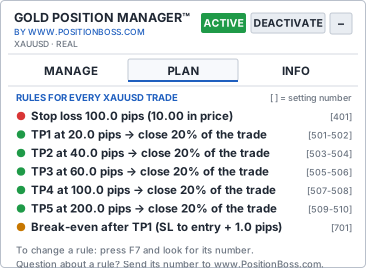
Write down four things before you click BUY or SELL: the stop loss (where the idea is wrong), the lot size (so that the stop costs your planned risk), the take-profit steps, and the break-even rule. If you need help with the first two, read how to set stop loss and take profit and use the gold lot size calculator.
Stage 2: protect the trade at once
Every trade needs a stop loss at the broker from the first second. A stop loss you "set later" is the one you forget when gold moves fast, especially on the phone.
By hand in MT5: in the Trade tab, right-click the position and choose Modify or Delete, enter the Stop Loss price and click Modify. You can also drag the stop line on the chart.
Stage 3: take profit in steps
Because a position has only one take-profit level, partial profits need an action at each level.
By hand in MT5: double-click the position, enter the volume to close (for example 0.02 of 0.10 lot) and click the close button. Repeat at each target, and keep your broker's minimum lot (often 0.01) in mind.
A common plan for a 0.10 lot: close 20% at each of five steps, for example 20, 40, 60, 100 and 200 pips. The numbers behind such a plan, in good and bad scenarios, are in partial take profit on gold.
Stage 4: move the stop to break-even
After the first target, many traders move the stop to the entry price plus a small buffer. From then on, a reversal costs little instead of the full stop. MT5 has no automatic break-even, so by hand you modify the stop yourself at the right moment. When to do it, and what break-even cannot protect against, is in break-even on gold.
Stage 5: lock in more as the trade runs
Once several targets are done, you can move the stop further into profit, for example behind the last swing or to the level of an earlier target. MT5's own trailing stop (right-click the position → Trailing stop) can do this automatically, but it runs in your terminal: according to the MT5 help, it does not work while the platform is off. Never move the stop further away from the price to "give the trade room".
A complete example
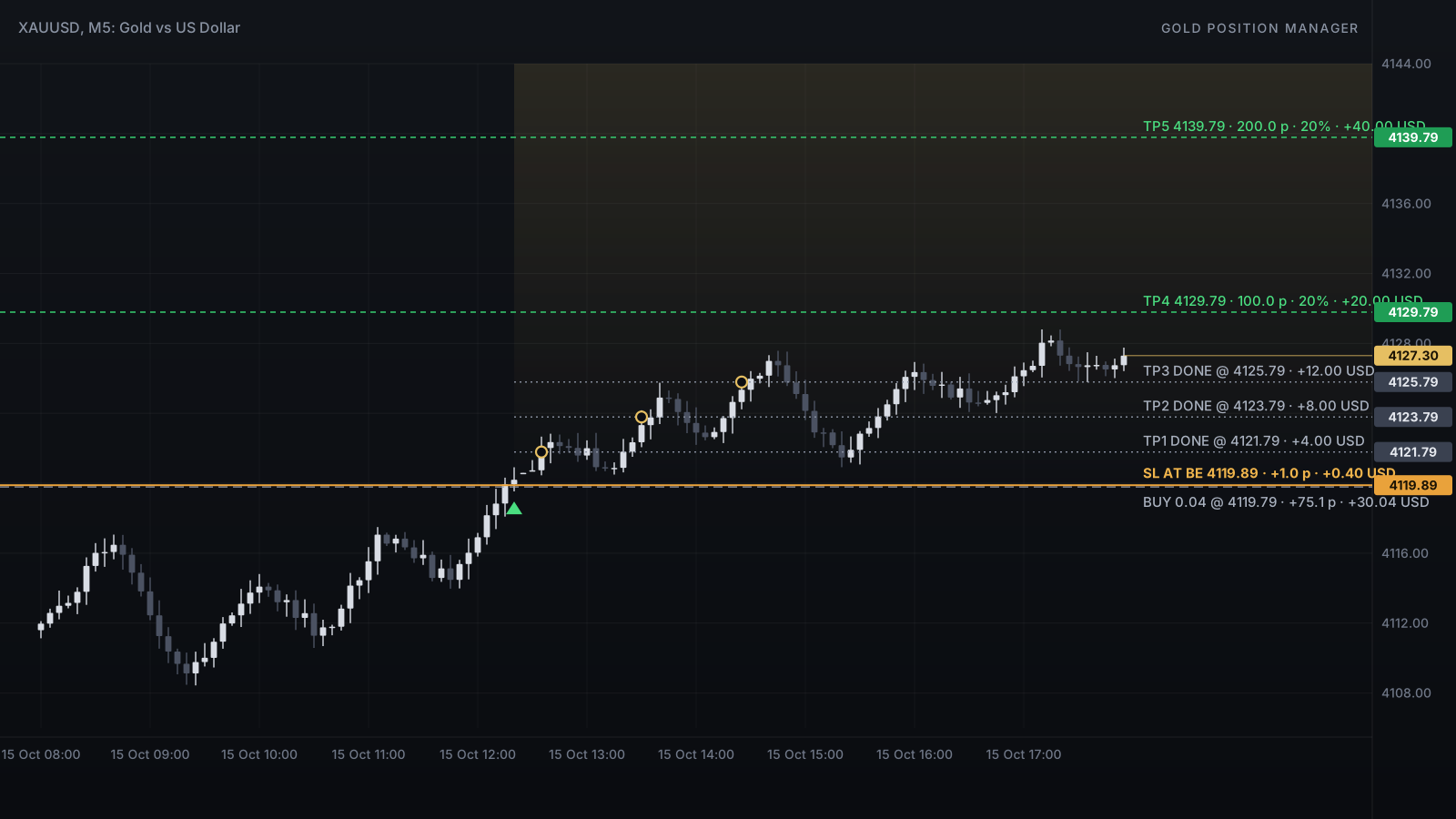
A BUY of 0.10 lot at 4,119.79 with a 100-pip stop and five steps of 20% (0.02 lot each):
| Moment | Price | Action | Open lot |
|---|---|---|---|
| Entry | 4,119.79 | Stop loss at 4,109.79 placed at once | 0.10 |
| TP1, 20 pips | 4,121.79 | Close 0.02 (+4.00 USD); stop to entry + 1 pip | 0.08 |
| TP2, 40 pips | 4,123.79 | Close 0.02 (+8.00 USD) | 0.06 |
| TP3, 60 pips | 4,125.79 | Close 0.02 (+12.00 USD) | 0.04 |
| Later | 4,127.30 | Booked so far +24.00 USD; the rest is protected at break-even | 0.04 |
Example numbers, before spread, commission and swap.
Managing several trades at once
With five gold trades open, every action by hand means five windows. Decide in advance which actions you apply to all trades (for example "all buys to break-even") and do them in the same order every time. Keep in mind that several trades add up: five trades at 1% risk each are 5% at risk.
By hand or automated?
| Task | By hand in MT5 | With a trade manager |
|---|---|---|
| Stop loss on a new trade | Modify window, every trade | Placed automatically |
| Five take-profit steps | Five manual closes at the right moment | Closed automatically |
| Break-even | Watch and modify yourself | Moved by your rule |
| Five trades | Five windows | One click for a group |
| PC asleep or off | Only the broker's stop works | The same: only the broker's stop works |
Either way, MT5 must be running for anything beyond the broker's stop. Read do MT5 EAs work when your computer is off? before trading away from your desk.
Stage 6: review
After the session, look at the day's profit and loss, the number of trades and whether you followed your plan. Two lines in a journal teach more than any indicator.
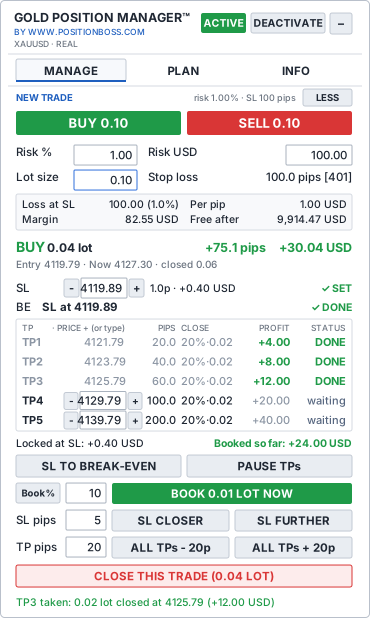
Gold Position Manager is an MT5 trade manager made only for gold. It places your stop loss when a trade opens and puts it back if it is removed, closes the trade in up to 10 take-profit steps, moves the stop to break-even by your rule and watches it afterwards. One-click buttons move the stop or all targets, book a % or a lot, or close the trade, and group buttons act on all, buy, sell or profitable trades at once. The INFO tab shows today's, this week's and this month's results. Take the panel tour.
Questions
Can MT5 take partial profits automatically?
Not by itself. An MT5 position has one take-profit level, which closes the whole position. To close parts at several levels you need to do it by hand or use an Expert Advisor.
Does MT5 have an automatic break-even?
No. You can move the stop by hand or use the built-in trailing stop, which runs only while the platform is on. Automatic break-even rules need an Expert Advisor.
Does the MT5 trailing stop work when MT5 is closed?
No. According to the MT5 help, the trailing stop is executed in the trading platform, not on the server, so it stops when the platform is off. Only the stop loss it already set stays at the broker.
Sources
- MetaTrader 5 Help: basic principles, stop loss, take profit and trailing stop
- MetaTrader 5 Help: symbol specification (minimum lot, lot step)
This guide is education, not financial advice. Trade management reduces some risks but cannot remove market risk, slippage or broker limits. Trading gold carries a high risk of loss.