Key points
- One MT5 terminal is logged in to one account at a time. Several accounts means several MT5 terminals, usually on one Windows VPS.
- Run one copy of a trade manager on each account, with the same settings, and every trade on every account gets the same stop loss, steps and break-even.
- You still open the trades. A trade manager does not copy trades between accounts; it manages what is on its own account.
- Check your prop firm's rules before trading the same setup on several accounts.
Why scalpers end up with several accounts
Usually for good reasons: a prop-firm challenge next to a personal account, a second broker with a better spread at certain hours, a small account to test a new plan, or separate accounts for different strategies. The trading idea is the same; the work is not. Every extra account means another stop loss to set, another set of partials to close and another break-even to remember, often for the same move in gold at the same moment.
Doing that by hand on two accounts is hard. On three or more it usually means one account gets managed well and the others get forgotten until the move is over.
How several accounts work in MT5
One MetaTrader 5 terminal shows one trading account at a time. To have several accounts running at once, traders install MT5 more than once, for example one installation per broker or per account, each in its own folder. Many brokers offer their own MT5 download, which makes this easy.
All of these terminals can run on the same computer. For scalping, a Windows VPS is the usual choice: it is always on, close to the broker's servers, and you can reach it from anywhere. As a rough guide, each MT5 terminal with a few charts needs a few hundred MB of memory, so a VPS with 4 GB is enough for several terminals. Check this with your VPS provider for your setup.
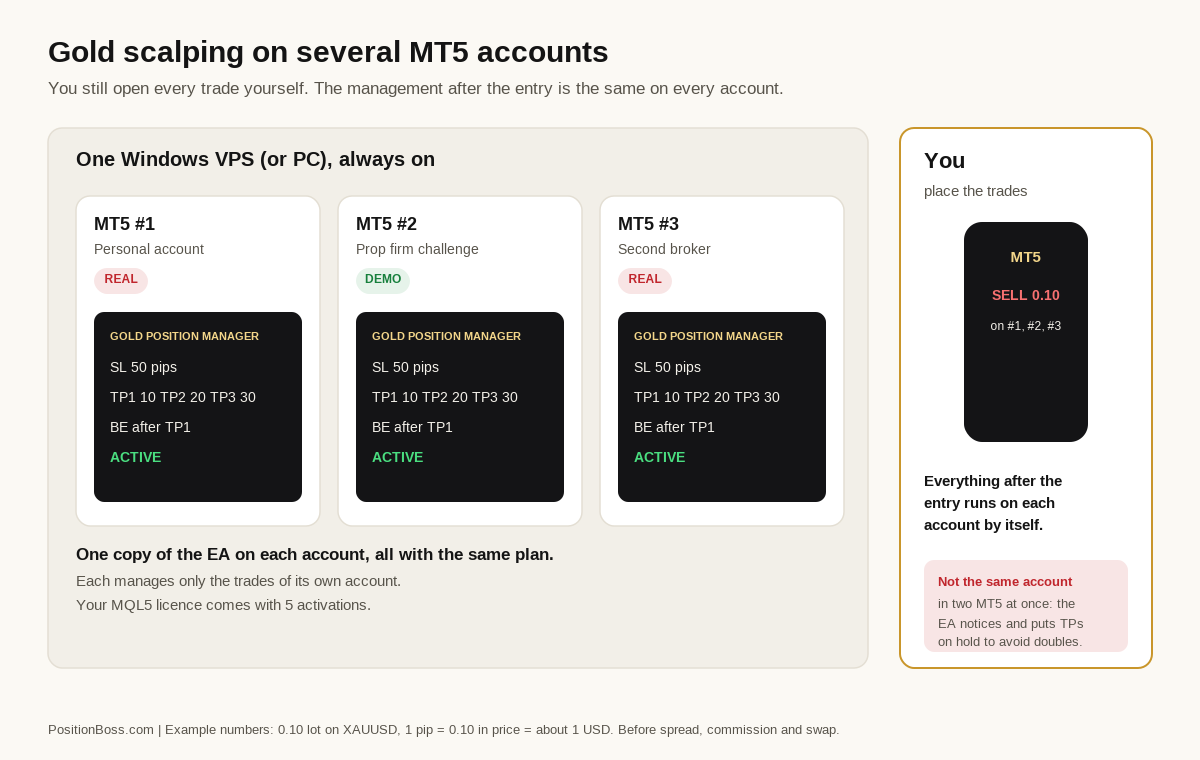
Setting up the same plan on every account
- Install MT5 once per account and log in to each one.
- Install Gold Position Manager in each terminal (in MT5: Market tab, Purchased, Install) and attach it to one XAUUSD chart per terminal.
- Set the plan once, then copy it. In the settings window of the first terminal, choose your stop loss, steps and break-even, then click Save to store them as a settings file. In the other terminals, click Load and pick that file. Every account now has the identical plan.
- Adjust what should differ. A prop challenge may need a smaller daily loss limit (settings [1001] to [1009]) or a lower risk per trade than your personal account.
- Press ACTIVATE on the panel of each terminal and confirm with a second click.
- Turn on phone alerts (setting [1309]) on each one, so you hear from every account.
Trading: you enter, each account manages
When you see a setup, you open the trade on each account the way you prefer: from the MT5 phone app (which can switch between accounts), from each terminal's order window, or from each panel's BUY and SELL buttons with the lot worked out from that account's risk. From the moment each trade appears on its account, that account's copy of Gold Position Manager places the stop loss, closes the steps and moves the stop loss to break-even.
So the part that multiplied (the stop losses, the partials, the break-evens, the watching) is gone. What is left is the entry on each account, which takes seconds.
Gold Position Manager does not copy trades from one account to another, and one panel does not control other accounts. Each copy manages only the gold trades of the account it runs on. If you want trades copied between accounts automatically, that is a job for a separate trade copier; setting [201] lets the manager look after copied trades too.
Rules that keep several accounts safe
- One copy per account. Never run the same account in two MT5 terminals with the EA on both. If it happens, Gold Position Manager notices the other copy and puts the take profits on hold, so no part is closed twice; the stop loss and break-even keep working.
- One chart per terminal. A second chart with the EA on the same terminal only watches; one chart manages.
- Check every account after a restart of the VPS: each panel should say ACTIVE.
- Keep the risk per account in money, not only in lots. The same 0.10 lot is a very different risk on a 1,000 USD account and on a 100,000 USD challenge.
Prop-firm accounts
Most prop-firm challenge accounts run on demo servers, and MT5 counts them as demo accounts. A trade manager works on them like on any account where Expert Advisors are allowed. Two cautions:
- Some firms do not allow certain EAs, or limit trading the same setup on several of their accounts. Read the firm's rules before you start.
- Daily loss limits on prop accounts are strict. Set Gold Position Manager's daily loss limit a little below the firm's limit, so the panel's BUY and SELL lock before the firm's rule is broken. Remember that this lock covers trades from the panel; trades you open elsewhere are still your responsibility.
Licence: how many computers?
Gold Position Manager is sold in the MQL5 Market with 20 activations: each new computer or VPS (each new combination of hardware and Windows) uses one. On a computer where it is activated, it works with any of your MT5 accounts. Check the activations shown in your MQL5 account before you install on several machines.
Questions
Can I run several MT5 accounts on one VPS?
Yes. Install MT5 once per account, each in its own folder (many brokers offer their own MT5 download), and log in to a different account in each. A VPS with a few GB of memory usually runs several terminals.
Can one trade manager control several MT5 accounts?
Not from one panel. Run one copy on each account's terminal with the same settings. Each copy then manages that account's trades automatically.
How do I copy my EA settings to another MT5 terminal?
In the EA's settings window, click Save to store the inputs as a settings file, then click Load in the other terminal and choose that file.
Is it allowed to trade the same gold setup on several prop-firm accounts?
It depends on the firm. Some allow it, some limit it. Always read the prop firm's rules before trading several accounts with the same plan.
This guide is education, not financial advice. Trading several accounts multiplies both gains and losses. Computers, VPS providers and brokers can fail; always be ready to manage your trades yourself. Trading gold carries a high risk of loss.