Key points
- Most signal members do not lose on the entry. They lose on everything after it: late partials, a forgotten break-even, missed updates.
- MT5 has one take profit per trade, so "TP1, TP2, TP3" signals need partial closes by hand, or three separate trades.
- A trade manager turns the signal's exit plan into automatic steps, so you only have to enter.
- Updates from the group ("move SL to break-even", "close half") become one click each.
Where signal followers really lose
Gold scalping signals are popular because they promise a shortcut: someone else finds the trade. But the signal is only the first ten seconds of the trade. Everything after the entry is still your job, and that is where most members fall behind:
- The entry is late. You were driving, working or asleep. Price is already 15 pips away, and TP1 is half done.
- Three targets, one take profit. MT5 gives a position one take profit. To take TP1, TP2 and TP3 as the signal says, you either close parts by hand or open three trades, each with its own target.
- The update comes at the worst moment. "TP1 hit, move SL to entry" arrives while you are in a meeting. Ten minutes later gold turns and the whole trade is a loss.
- Several signals at once. On a busy day the group sends four or five gold trades. Keeping each one's stop loss, partials and break-even right by hand is close to impossible.
None of this is about the quality of the signal. A good signal followed badly loses money. A plan that runs by itself protects you from your own busy day.
From signal to managed trade
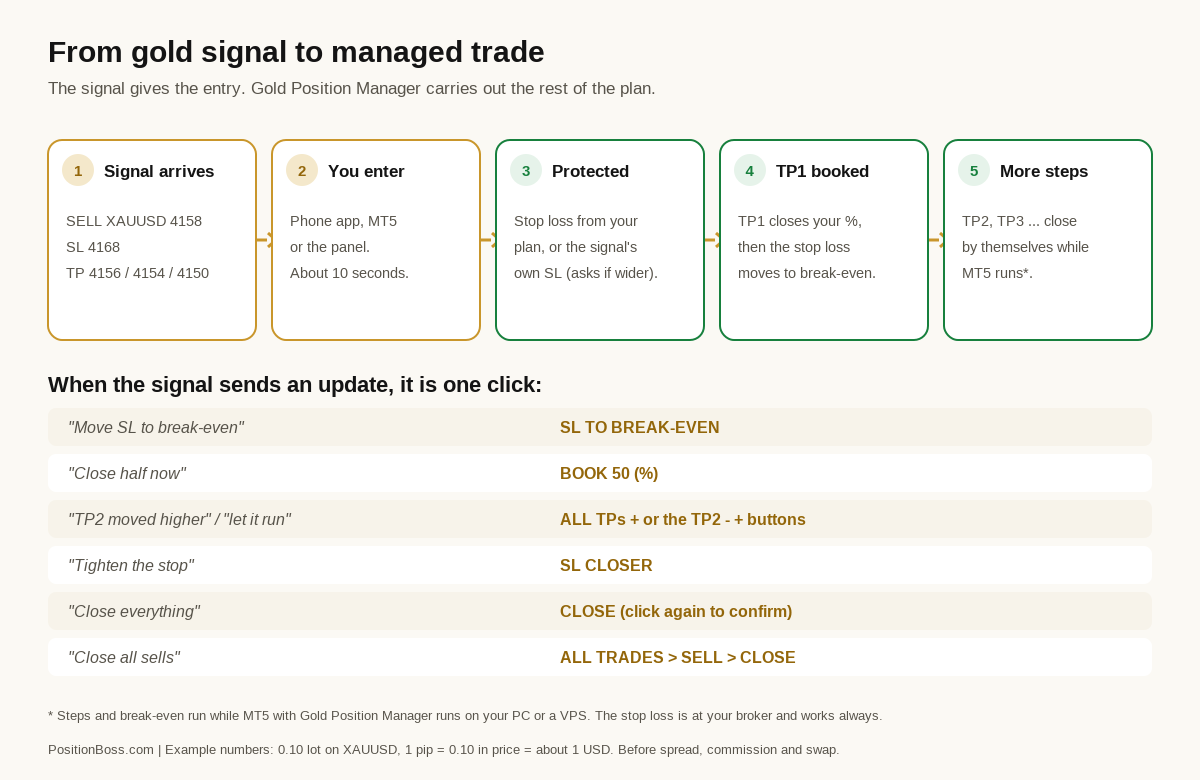
1. Set your plan to match the group
Look at the last 20 signals of your group. Most groups use similar distances every time, for example TP1 20 pips, TP2 40 pips and TP3 60 or more from the entry, with a stop loss of 50 to 100 pips. Set your steps to those distances and decide how much each step closes, for example 30%, 30% and 40%. Choose the break-even rule the group uses, usually "after TP1".
2. Enter as fast as you can
Open the trade from wherever you are: the MT5 phone app, the MT5 order window or the panel's BUY and SELL buttons, which also work out the lot from your risk. You do not have to type the stop loss and three targets under time pressure.
3. Let the plan protect the trade
Within seconds the trade has its stop loss at your broker, and the steps are waiting at their distances. If you did enter with the signal's own stop loss, it is kept; if that stop loss is wider than your plan, the panel asks: KEEP MY SL or USE PLAN SL. It never widens your risk by itself.
4. Steps and break-even run by themselves
When TP1 is reached, its part is closed and the stop loss moves to break-even. TP2 and TP3 close their parts when price gets there. Every action is written to the MT5 Experts log with its price, so you can compare your result with the group's afterwards.
When one signal is different
Sometimes a signal has unusual targets, for example a wider TP3 before news. You do not need to change your settings for one trade. On the panel, each step has its own price box and − / + buttons: type the signal's exact TP3 price, or nudge it. The other steps stay as they are. The same works for the stop loss: type the price, use SL CLOSER, or drag the line on the chart.
Following updates with one click
| The group says | By hand in MT5 | With Gold Position Manager |
|---|---|---|
| "Move SL to break-even" | Open the trade, modify, type the entry price | SL TO BREAK-EVEN |
| "Close half now" | Open the trade, type half the volume, close | BOOK 50% |
| "Let it run, TP3 moved higher" | Modify the take profit | ALL TPs + or TP3 + |
| "Tighten the stop" | Modify the stop loss, type a price | SL CLOSER |
| "Close all sells" | Close each sell trade one by one | ALL TRADES, group SELL, CLOSE |
| "Protect everything, news in 5 minutes" | Modify every trade | ALL SL TO BREAK-EVEN |
Big actions such as closing a whole group ask for a second click, so a nervous tap does not close everything. The full button map: one-click trade management for gold scalpers.
"I open three trades, one for each TP"
Many members copy a signal as three separate trades, each with its own take profit at the broker. It works, but it triples the typing, and each of the three needs its own stop loss and break-even. With a trade manager, one trade with three steps does the same job with one entry.
If you keep the three-trade habit, note that a take profit at the broker closes the whole trade, before any partial step. Gold Position Manager shows THIS TRADE HAS A BROKER TP and lets you choose REMOVE IT (so the steps manage the trade) or KEEP IT.
If you use a signal copier
Some members copy signals automatically with a copier program. A trade manager can work next to it: setting [201] decides which gold trades are managed, for example every gold trade including those of other programs, or only the trades with one magic number. Two rules: let only one program manage the exits of a trade, and test the combination on a demo account before you rely on it.
When you are busy, travelling or asleep
Signals do not wait for a good moment. Run MT5 with the trade manager on a Windows VPS, which is always on, and use the MT5 phone app only to enter. The steps and break-even then run even while you are away. Turn on alerts to your phone (setting [1309]) so you hear when something needs you. Without a VPS, the steps work only while your PC is on and awake; the stop loss at your broker always works.
An honest word about signal groups
Good trade management makes a good signal better and limits the damage of a bad one. It cannot turn a losing signal provider into a winning one. Be careful with groups that promise fixed profits, show only winning trades or push you to bigger lots. Test any group on a demo account first and track its real results over weeks.
Questions
How do I take TP1, TP2 and TP3 from one gold signal in MT5?
MT5 allows one take profit per trade, so either close parts by hand at each target, open one trade per target, or use a trade manager that closes a set % of one trade at each target automatically.
Can a trade manager move my stop loss to break-even when TP1 is hit?
Yes. Gold Position Manager moves the stop loss to the entry plus a buffer you choose after TP1 (or another step), and you can also do it any time with one click.
Does it work with trades I open from the MT5 phone app?
Yes, as long as MT5 with Gold Position Manager runs on your PC or a VPS for the same account. The phone app itself cannot run Expert Advisors.
Will it follow the signal group's messages automatically?
No. It does not read Telegram or WhatsApp. It carries out your exit plan automatically, and you turn the group's updates into one-click actions on the panel.
This guide is education, not financial advice. Trading signals can lose money, and no trade manager can make a signal profitable. A trade manager works only while MetaTrader 5 runs on your PC or VPS. Trading gold carries a high risk of loss.