Key points
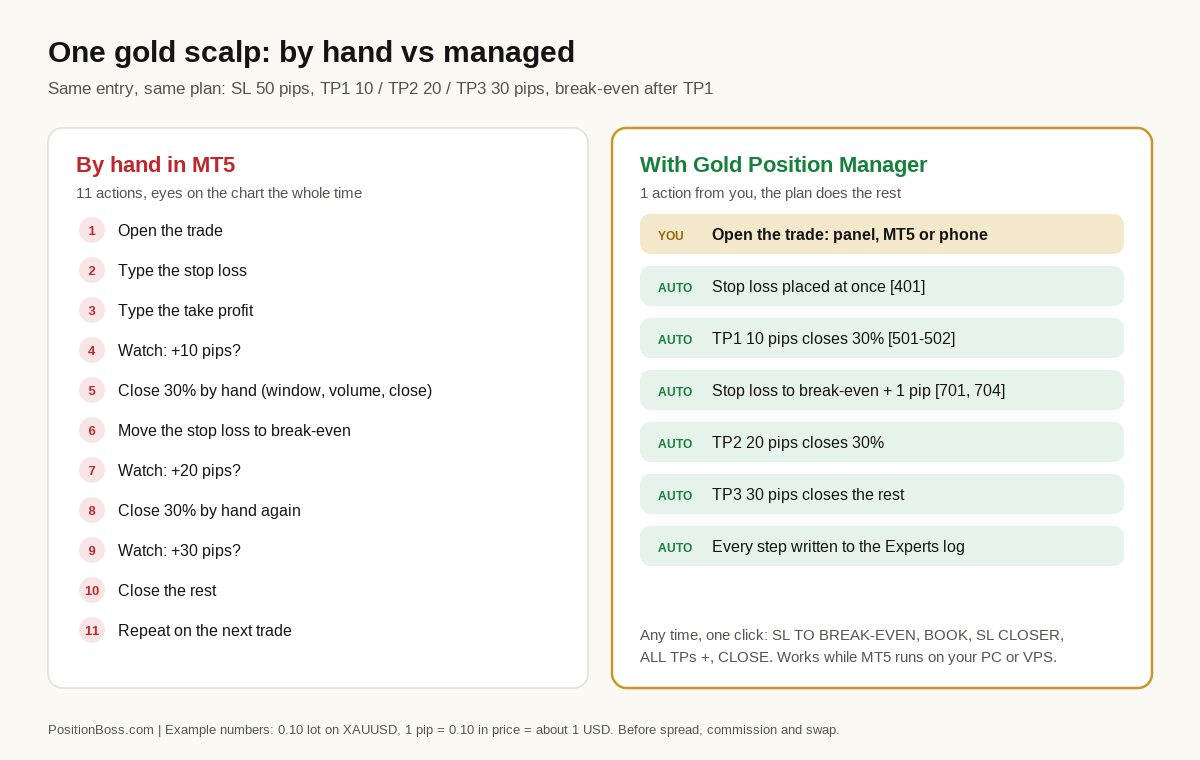
- A typical gold scalp needs 10 or more manual actions in MT5: stop loss, several partial closes, break-even and the final exit, all while price moves 2 to 3 pips per second.
- A trade manager carries out that routine for you. You set your style once, then you only open the trade.
- Gold Position Manager is a trade manager made only for XAUUSD: stop loss at once, up to 10 profit steps, break-even by your rule, and one click for everything else.
- It does not give signals and never opens a trade by itself on a live chart. You stay the trader.
How gold scalpers really trade
Ask ten gold scalpers about their routine and most describe the same thing. The entry is quick. The first target is small, often 10 to 20 pips, because gold can turn just as quickly as it moved. As soon as the first part is booked, the stop loss goes to break-even so the trade can no longer become a loss. Then a little more is booked every few pips, and a last part is left to run in case gold keeps going.
It is a good routine. It keeps losses small, banks profit before a pullback takes it away, and it removes a lot of the stress of watching an open trade. The problem is not the idea. The problem is doing it by hand, on every trade, at gold speed.
Why this routine is so hard in MT5
MetaTrader 5 gives every position one stop loss and one take profit. Everything else in the scalper's routine is manual work:
- Partial profits mean opening the trade window, typing the volume and pressing close, once for every step.
- Break-even means watching the price, opening the modify window and typing the entry price plus a small buffer.
- On the phone each of these takes even longer, and the first target may already be gone.
- With two or three trades open the work multiplies, and mistakes start: the wrong volume, the wrong trade, a forgotten stop.
Gold moves 50 to 100 pips in minutes during the London and New York sessions. A 10-pip target can come and go in the time it takes to type a volume. So scalpers end up skipping steps: no partial because it was too fast, no break-even because they were busy with the next trade. The routine that protects them is the first thing to break when the market gets busy.
What a trade manager is (and what it is not)
A trade manager is an Expert Advisor that looks after trades you open. It does not look for entries and it does not predict the market. That is the difference from a trading robot: a robot decides when to trade, a trade manager decides nothing. It carries out the exit plan you gave it, the same way on every trade. If you want the full comparison, read trading robot vs trade manager.
For scalpers this is exactly the right split. Your edge is the entry: your reading of the chart, your levels, your signal. The exit routine is the part that should be mechanical, and it is the part a program does better than a person in a hurry.
Step 1: set your scalping style once
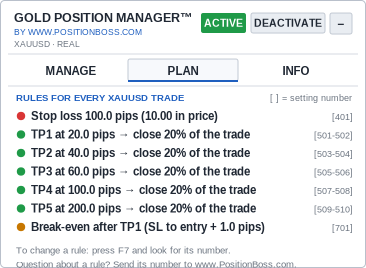
Gold Position Manager stores your routine as settings, each with a fixed number so you always know which one you are changing. A typical quick-scalp setup looks like this (an example, not a recommendation):
| Your rule | Example | Setting |
|---|---|---|
| Stop loss | 50 pips from the entry | [401] |
| First profit step | 10 pips, close 30% | [501] and [502] |
| Second step | 20 pips, close 30% | [503] and [504] |
| Third step | 30 pips, close the rest (40%) | [505] and [506] |
| Steps 4 and 5 | not used (close % = 0) | [508] and [510] |
| Break-even | after TP1, entry + 1 pip | [701] and [704] |
| Which trades to manage | your own trades and the panel's trades | [201] |
You can use up to 10 steps, and together they may close 100% of the trade or less. Break-even can start after TP1, TP2, TP3, after any step number, or after a profit distance you choose, and it can also cover commission and swap ([705]). The PLAN tab on the panel then shows your rules in plain sentences, so you can check them before the session.
Want three ready-made plans for different scalping styles, with the money worked out for each step? See gold scalping exit plan: book profit every few pips.
Step 2: just place the order
Open the trade the way you always do. Gold Position Manager picks it up from three places:
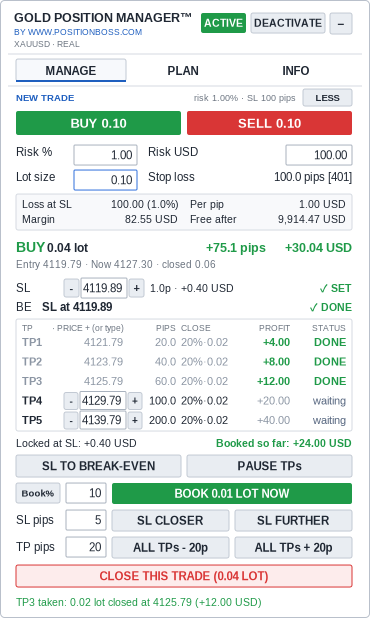
- The panel's BUY and SELL buttons, which also work out the lot from your risk (for example 1% or 100 USD) and show the loss at the stop before you click.
- The normal MT5 order window or one-click trading on the chart.
- The MT5 phone app. The trade is managed as soon as it appears on the account, as long as MT5 with Gold Position Manager is running on your PC or a VPS.
From that moment the plan runs by itself: the stop loss is placed at your broker within seconds, each step closes its part when price gets there, and the stop loss moves to break-even when your rule says so. Every action is written to the MT5 Experts log with its price, so you can check afterwards exactly what happened.
A 0.20 lot SELL on gold opened at 4158.53. The stop loss was on the trade in the same second. TP1 closed 0.02 lot about 30 seconds later, and the stop loss moved to break-even at the same moment. TP2, TP3 and TP4 followed over the next four minutes without a click.
Step 3: step in with one click whenever you want
Automation does not mean giving up control. Scalpers react to the market all the time, and the panel turns each reaction into one click:
- SL TO BREAK-EVEN now, before the plan would do it.
- BOOK a % or an exact lot at market; the remaining steps adjust.
- SL CLOSER or SL FURTHER by your step, or type a price, or drag the line on the chart.
- ALL TPs + and ALL TPs − to move every waiting target, or − / + on one step only.
- PAUSE TPs to hold the steps while the stop loss and break-even keep working.
- CLOSE the trade, with a second click to confirm.
- ALL TRADES with the groups ALL, BUY, SELL and IN PROFIT, to move stops to break-even, book or close many trades at once.
Each button replaces several steps in MT5's own trade window. The full button map is in one-click trade management for gold scalpers.
Three kinds of scalpers it helps most
Scalpers who trade from their phone
Run MT5 with Gold Position Manager on a Windows VPS, and the phone becomes a remote control: open the trade in the MT5 app, and the stop loss, steps and break-even are handled on the VPS. Turn on phone alerts (setting [1309]) so you hear about anything that needs you. Why this works, and its limits: do MT5 EAs work when your computer is off?
Members of gold signal groups
A signal gives you the entry. Following the rest (partials, break-even, updates from the group) is where most members lose the profit. A trade manager carries out the plan while you are still reading the next message. See how to manage gold scalping signals in MT5.
Traders with several accounts
Personal account, a prop-firm challenge, a second broker: run one copy of Gold Position Manager on each account with the same plan, and every trade on every account gets the same management. You still open the trades; the work after the entry disappears. See gold scalping on several MT5 accounts.
Made for gold, not adapted to it
- Gold pips by default: 1 pip = 0.10 in price, so a 20-pip step means 2 dollars of price movement. Broker names like XAUUSD.m or XAUUSD+ are recognised.
- Broker limits respected: if your lot cannot be split exactly into your steps (for example 10% of 0.05 lot), the panel says so and offers SPLIT CLOSEST instead of guessing.
- Spread limit and fast-market warning for panel trades, because gold's spread widens around news.
- Daily limits: maximum daily loss, maximum trades and a pause after a stop loss lock the panel's BUY and SELL buttons. Useful on the days scalpers overtrade.
- INFO tab: today's, this week's and this month's results, spread, broker time and the high-impact news of the next two days.
Safety rules built in
- It never removes or widens a stop loss by itself. If your own stop loss is wider than the plan, it asks: KEEP MY SL or USE PLAN SL.
- If a stop loss is removed from a trade, it is put back (setting [402]).
- Every step is saved before each close, so a restart of MT5 or the PC never takes the same step twice.
- If the same account runs the EA in a second MT5, it notices and puts the take profits on hold, so nothing is closed twice.
- Nothing happens until you press ACTIVATE on the panel and confirm with a second click.
What it does not do
- It does not give signals or choose entries, and it cannot make a bad entry good.
- It runs inside MT5 on Windows. While your PC sleeps, only the stop loss at your broker protects the trade (and the last take profit, if you give it to the broker with [801]). For trading away from your desk, use a VPS.
- It cannot prevent slippage or a wide spread. Break-even is close to risk-free, not completely risk-free.
- It does not run on the MT5 phone app by itself; the phone is the remote control.
How to try it
Gold Position Manager is sold in the MQL5 Market, the official store for MetaTrader programs: $30 for 6 months, $50 for a year, or $149 to buy it. Before you pay, click "Free Demo" on the MQL5 page. The demo runs in the MT5 Strategy Tester, where the EA opens example trades by itself (setting [1401]), so you can watch the stop loss, each step and the break-even on gold history. On a live chart it never opens a trade by itself.
Questions scalpers ask
Is there an EA that manages gold scalping trades automatically in MT5?
Yes. A trade manager such as Gold Position Manager places the stop loss as soon as a gold trade opens, closes it in up to 10 profit steps and moves the stop loss to break-even by your rule. You still choose and open the trades yourself.
Can it take partial profit every few pips?
Yes. You set each step's distance and the % it closes, for example 30% at 10 pips, 30% at 20 pips and the rest at 30 pips. Your broker's minimum lot decides how small a part can be, so very small trades need fewer steps.
Does it move the stop loss to break-even automatically?
Yes: after TP1, TP2, TP3, after any step number or after a profit distance, with a buffer you choose (for example entry + 1 pip). You can also do it any time with one click.
Does it manage trades I open on my phone?
Yes, as long as MT5 with Gold Position Manager is running on your PC or a VPS for the same account. The phone app cannot run Expert Advisors by itself.
Will it open trades for me?
No. On a live chart it never opens a trade by itself. It only manages the trades you open. Only in the Strategy Tester demo does it open example trades, because nobody can click the panel there.
Can I use it on a prop-firm account?
It works on any MT5 account where Expert Advisors are allowed. Prop firms have their own rules about EAs, so check them first. Many challenge accounts run on demo servers.
This guide is education, not financial advice. Scalping means many trades and many costs, and it is not suitable for everyone. A trade manager carries out your rules: it cannot promise any result, and it works only while MetaTrader 5 runs on your PC or VPS. Trading gold carries a high risk of loss.