The stop loss you forgot
You opened the trade on your phone and meant to set the stop later. One fast candle later, it was too late.
Made only for gold · XAUUSD · MetaTrader 5
Gold Position Manager is the MT5 trade manager made only for gold. You open the trade. It sets your stop loss, takes profit in up to 10 steps and moves your stop loss to break-even. By your rules, the same way on every trade.
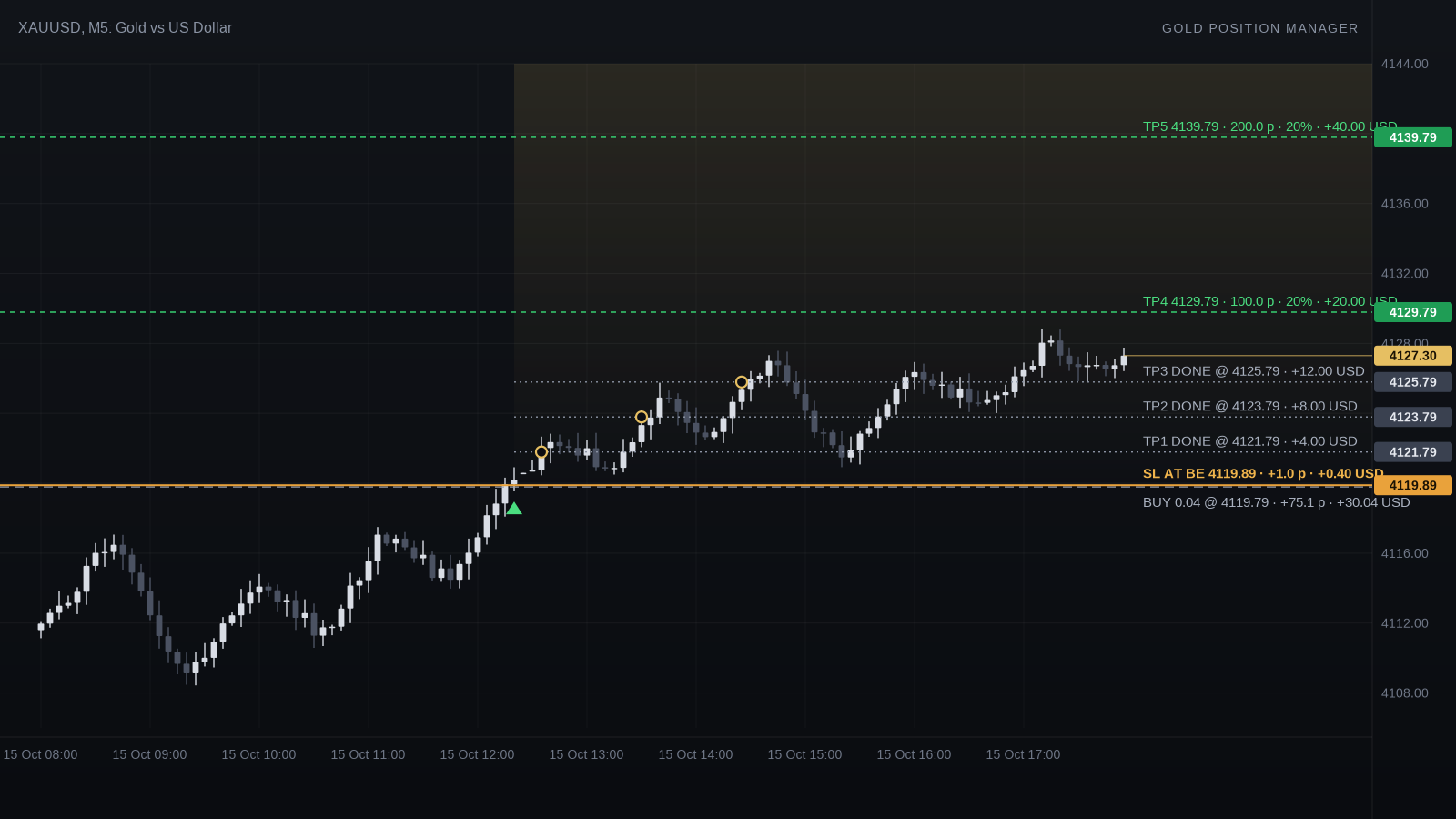
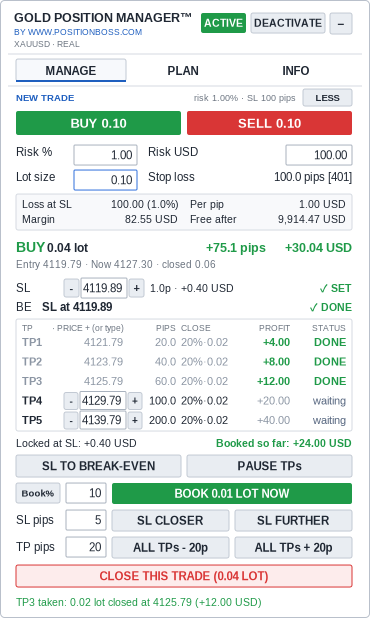
Every gold trader dreams big. The ones who last share one habit: they protect every trade, take profit step by step and don't hand back what the market already paid them. Gold Position Manager builds that habit into every trade you open.
The real problem
The hard part starts after you click BUY or SELL. Gold moves fast, and emotions move faster.
You opened the trade on your phone and meant to set the stop later. One fast candle later, it was too late.
The trade was 80 pips in profit. You waited for more, and closed it at a loss.
Fear closed the whole trade at 20 pips. Then gold ran 200 pips without you.
Closing part of five trades in MT5 means five windows and five volumes to type, while the price runs.
Gold Position Manager follows your plan, even when your emotions don't.
What it does
It never decides when to buy or sell. You set your rules once; it applies them to every gold trade, and you can step in with one click at any time.
Your stop loss is placed right after the trade opens: from the panel, from MT5 or from your phone. Pending orders get it too. If a stop loss is removed, it is put back.
Each step closes the part you choose, for example 20%. Lock in profit early and let the rest run, without watching every tick.
After TP1, TP2, any step you choose or a profit distance, the stop loss moves to your entry plus a small buffer. If something moves it back, it is set again.
Stop loss to break-even, pause the steps, book profit, move the stop loss or all targets, close the trade. Each is one click, right on your chart.
Type an exact stop loss or target price, nudge it with − and +, or drag its line on the chart. A typing mistake far away needs a second confirmation.
Close 10% now, or exactly 0.02 lot. The remaining steps adjust to what is left, and a booking never closes the whole trade by accident.
Pick ALL, BUY, SELL or IN PROFIT, then move them to break-even, book a part or close them with one click. One list shows every trade with its pips and profit.
Choose 1% or 100 USD, and the BUY and SELL buttons show the lot that fits your stop loss. A trade above your maximum risk is blocked.
Set a maximum daily loss, a maximum number of trades or a pause after a stop loss. When a limit is reached, the panel's BUY and SELL buttons lock: for the rest of the day, or for the pause you chose.
Block new trades from the panel when the spread is too wide, and get a warning when gold suddenly moves very fast.
Warnings can be sent to your MetaTrader 5 phone app, for example when your PC was asleep while a trade was open.
Every step is saved before each close, so a restart never takes the same step twice. After a restart it continues where it left off.
Meet the panel
This is what you see on your chart. Here is what each part does for you.
MANAGE
Open a trade, follow it live and change anything with one click.
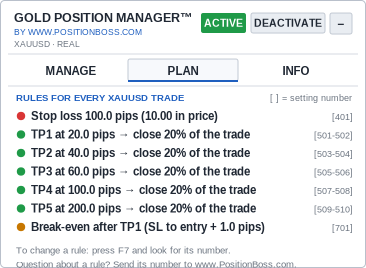
PLAN
The PLAN tab shows exactly what will happen to every gold trade, before it happens.
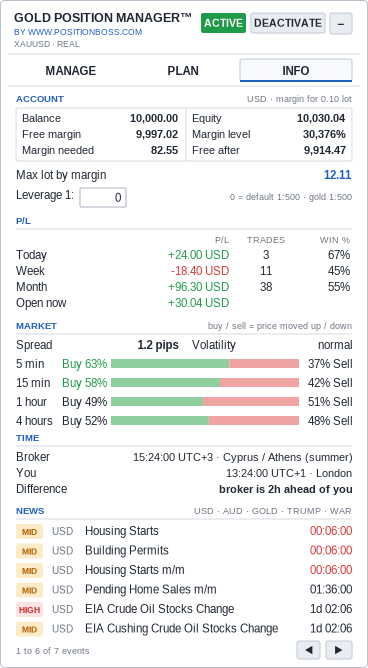
INFO
Everything you check before a trade, without opening five MT5 windows.
How a trade is managed
An example with 0.10 lot on gold (1 pip = 0.10 in price = 1.00 USD for 0.10 lot at most brokers).
Five steps, each closing 20% of the lot. The money shown is what each step books if it is reached.
What happens after the entry, without a click from you.
Your broker fills every close at the price available, which can differ in fast markets.
You choose what you are willing to lose. The lot follows.
Lot = risk ÷ (stop loss in pips × 10 USD per pip per lot). Contract sizes can differ; the panel uses your broker's values.
Choose the group, then one button acts on all of its trades.
BUY: SL TO BREAK-EVEN protects four trades with a single click. Then book 10% of each, or close only the sells.
By hand vs. with the tool
| Task | By hand in MT5 | With Gold Position Manager |
|---|---|---|
| Stop loss on a new trade | Type it for every trade, easy to forget on the phone | Placed automatically, put back if removed |
| Taking partial profit | Open the trade window, type the volume, repeat | Automatic steps, or one click by % or lot |
| Break-even | Watch the price and move it yourself | Moves by your rule and is watched afterwards |
| Changing targets | Edit each order separately | Type, nudge or drag, or move all at once |
| Five open trades | Five windows, five edits | Pick a group, one click |
| Lot size | Calculator outside MT5 | Worked out from your risk on the panel |
| A bad day | Willpower only | Daily limits lock the panel's BUY and SELL |
| PC off or asleep | Only the broker's stop loss works | The same: only the broker's stop loss works. Use a VPS |
Your style, your plan
One tool, any plan. Three examples that show how flexible it is. Examples only, not recommendations.
Read more: Gold scalping exit plan: 3 ready setups and a trade-management routine for gold scalping
About Gold Position Manager
Gold scalpers book a small profit fast, move the stop loss to break-even as soon as they can and close the rest in pieces every few pips. In MetaTrader 5 every one of those steps is manual, on every trade, at gold speed. Gold Position Manager does them for you. You set your trading style once, place the order, and it carries out the plan: from the panel, the MT5 order window or your phone.
Stop loss the second the trade opens, profit booked in up to 10 steps, break-even after TP1 or any step you choose. When you want to step in, every action is one click.
The signal gives the entry; the rest is where most members lose. Enter in seconds, and partials and break-even run by themselves. "Move SL to entry" or "close half" from the group: one click.
Personal account, prop challenge, second broker: run one copy on each account with the same plan. You place the trades; the management after the entry runs by itself on every account.
Made only for gold, and built together with traders. Tell us what would make it better for your scalping: support@positionboss.com or a message on MQL5.
Where it runs: please read
Gold Position Manager lives inside MetaTrader 5 on a Windows computer. It does not run in the phone app and not in our cloud. That is true for every MT5 Expert Advisor.
Works fully while it is switched on, awake, online and running MT5. Set Windows to never sleep while trades are open.
A rented computer that is always on. Run MT5 with Gold Position Manager there, and your trades are managed while your own PC is off.
Open and watch trades in the MT5 app. They are managed only while your PC or VPS with Gold Position Manager is running for the same account.
| What | PC or VPS running | PC asleep, off or offline |
|---|---|---|
| Stop loss of each trade (at your broker) | works | works |
| Take-profit steps and break-even | works | stops |
| Putting back a removed stop loss | works | stops |
| Trades opened on your phone | managed | not managed |
| Alerts | sent | not sent |
When the PC is back, it continues from its saved progress and tells you how long it was not running. Full details and your manual plan: System requirements and operating limits.
Setup
Try the free demo, then buy or rent it on the MQL5 Market. In MT5 open the Market tab, then Purchased, and click Install. It appears in the Navigator under Expert Advisors → Market.
Drag Gold Position Manager onto an XAUUSD chart, switch Algo Trading on and allow it in the settings.
Choose your stop loss, take-profit steps, break-even and risk. The PLAN tab shows the result in plain words.
Try every button on a demo account first. Press ACTIVATE on the panel and click again to confirm: nothing happens before that.
Is it for you?
Pricing
Gold Position Manager is sold in the MQL5 Market, the official store for MetaTrader programs. Every option has every feature. Choose how you want to pay on the MQL5 page.
Free try before you pay
Every feature, in the MT5 Strategy Tester
From $30 free demo first
Every feature, 20 activations, any MT5 account
Free demo first. Click "Free Demo" on the MQL5 page and watch it manage example gold trades in the MT5 Strategy Tester, before you pay anything.
Paid and delivered by MQL5. Payment, installation into your MT5 and updates all go through your MQL5 account.
Help from us. Questions about a setting? Write to us or send us a message on MQL5. Tell us the setting number.
An activation is used for each new computer or VPS (each new combination of hardware and Windows). A rental ends after the period you paid for and does not renew by itself; rent again or buy to continue. Prices in US dollars, as shown on the MQL5 page. Taxes or payment fees, where they apply, are shown by MQL5 when you pay.
Learn
Plain-English guides and a free calculator, useful with or without our tool. See all guides.
Your balance, risk and stop loss in; the right XAUUSD lot out.
Open the calculator → Trade managementStop loss, take profit in steps, break-even: by hand and automated.
Read the guide → Gold basicsSeven factors every XAUUSD trader should understand.
Read the guide → ScalpingA simple management routine for fast XAUUSD trades.
Read the guide →Questions
No. Gold Position Manager is a trade manager. You decide when to buy or sell; it carries out your plan for the stop loss, take-profit steps and break-even. It does not predict the market and it cannot promise profit.
No, no Expert Advisor can. While the PC sleeps, only orders already at your broker work: the stop loss of each trade (and the last take-profit, if you give it to the broker). Keep your PC awake or run MT5 on a VPS.
Yes. Set it up once on a VPS. Then trade from anywhere, even your phone. Your rules stay active 24/7. MT5 phone apps cannot run Expert Advisors, so your trades are managed while MT5 with Gold Position Manager runs on your PC or VPS for the same account.
It was built with gold scalping in mind: protection right after the entry, small steps like 20, 40 and 60 pips, and one-click booking and break-even. It does not choose your entries, and your broker's spread and speed still matter.
Any MetaTrader 5 broker that offers gold (XAUUSD) on a hedging account. It works with IC Markets, Vantage, VT Markets, PU Prime, HF Markets and other brokers. Try it on a demo account with your own broker first.
Yes. By default it manages your own XAUUSD trades and the trades from its BUY / SELL buttons. Setting 201 lets you choose, for example, to leave trades of other robots alone.
Yes. Click "Free Demo" on our MQL5 page. The demo runs in the MT5 Strategy Tester, where the EA opens example trades by itself (setting 1401), so you can watch the stop loss, the take-profit steps and the break-even on real gold prices before you pay.
In the MQL5 Market, the official store for MetaTrader programs: Gold Position Manager on MQL5. Rent it for 6 months ($30) or 1 year ($50), or buy it once ($149). MQL5 takes the payment and installs it into your MT5.
No. It helps you follow your rules; it cannot remove market risk, slippage or broker limits. Test it on a demo account and use a risk you can afford.
Then the next one, managed the same way. Try the free demo, then choose the option that fits your trading.