Key points
- Open the tester with Ctrl+R. For honest results use Every tick based on real ticks, a random delay, your real deposit and leverage, and keep the last third of the data for a forward check.
- Read the report as a whole: a big profit means little without the drawdown, the number of trades and the losing runs.
- Most paid EAs on the MQL5 Market offer a free demo that runs only in the tester, so you can test before you pay.
- A trade manager is tested differently from a robot: you check that it carries out its rules exactly, not that it "makes money".
What the Strategy Tester can and cannot tell you
A backtest answers one question: if this EA had run on these past prices, with these settings, what would it have done? That is useful for three things: checking that the EA does what its description says, seeing how it behaves in calm and wild markets, and spotting obvious dangers such as deep drawdowns or no stop loss.
What a backtest cannot do is tell you the future. Markets change, live spreads and fills are worse than in most tests, and any strategy can be tuned to look perfect on the past. Treat a good backtest as a reason to keep testing, never as proof.
Before you start
- Use the MT5 desktop program on Windows (or a Windows VPS). The tester is not available in the phone app.
- Log in to the broker you will really trade with. The tester uses that broker's symbols, price history and trading conditions, and gold differs from broker to broker.
- Get the EA. Your own file goes in the Experts folder. A program from the MQL5 Market appears under Navigator > Expert Advisors > Market after you click "Free Demo" or buy it.
- Allow time for the first run. With real ticks, MT5 downloads the tick history first, which can take a while for one or two years of gold.
Step by step: set up the test
Open the tester with Ctrl+R or View > Strategy Tester. You can also right-click the EA in the Navigator and choose Test. Then go through the Settings tab from top to bottom:
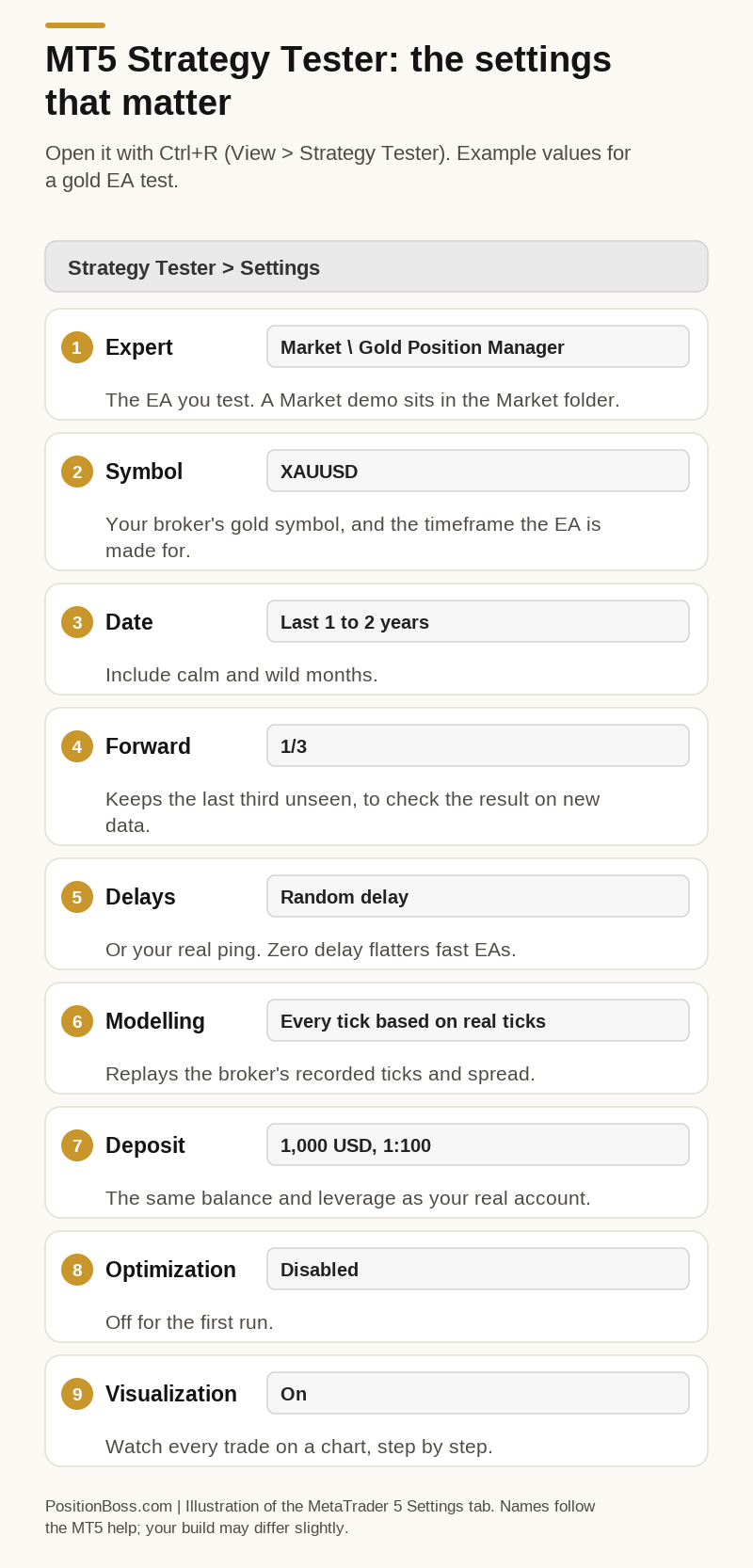
- Expert: choose the EA. A Market demo is listed in the Market folder.
- Symbol and timeframe: your broker's gold symbol (XAUUSD, XAUUSD.m, GOLD...) and the timeframe the developer recommends.
- Date: a custom period of at least one to two years. Make sure it includes fast, news-driven months, not only a calm trend.
- Forward: 1/3. MT5 then tests the first two thirds normally and shows the last third separately, as unseen data.
- Delays: Random delay, or a fixed delay equal to your real ping. "No delay" fills every order at the requested price, which flatters fast strategies.
- Modelling: Every tick based on real ticks (see the next section).
- Deposit and leverage: the same as the account you will trade. Results in % only mean something at your own size.
- Optimization: Disabled for the first run. Optimization searches for the best settings on the past, which is exactly how over-fitting happens.
- Visualization: on for the first run, so you can watch each trade on a chart. Turn it off later for faster tests.
Then open the Inputs tab and set the EA's own settings, the same ones you would use live. If your account pays commission, check the tester's advanced settings so the commission is included. Press Start.
Which tick modelling mode to use
| Mode | What it does | Use it for |
|---|---|---|
| Every tick based on real ticks | Replays the ticks your broker recorded, with their real spread | Final checks, and any EA that trades fast or uses tight stops |
| Every tick | Generates ticks inside each minute bar from its prices | Quicker tests when real ticks are not available |
| 1 minute OHLC | Uses only the open, high, low and close of each minute | Rough first checks of slow EAs |
| Open prices only | Uses only the opening price of each bar | EAs that act only once per bar, by design |
| Math calculations | No prices at all | Programming tasks, not trading tests |
On gold, where price can jump several pips between two ticks and the spread changes during news, "real ticks" is the only mode that comes close to what you will really get. Generated ticks tend to make scalpers and tight stops look better than they are.
How to read the backtest report
After the run, the report shows dozens of numbers. These eight tell you most of what you need:
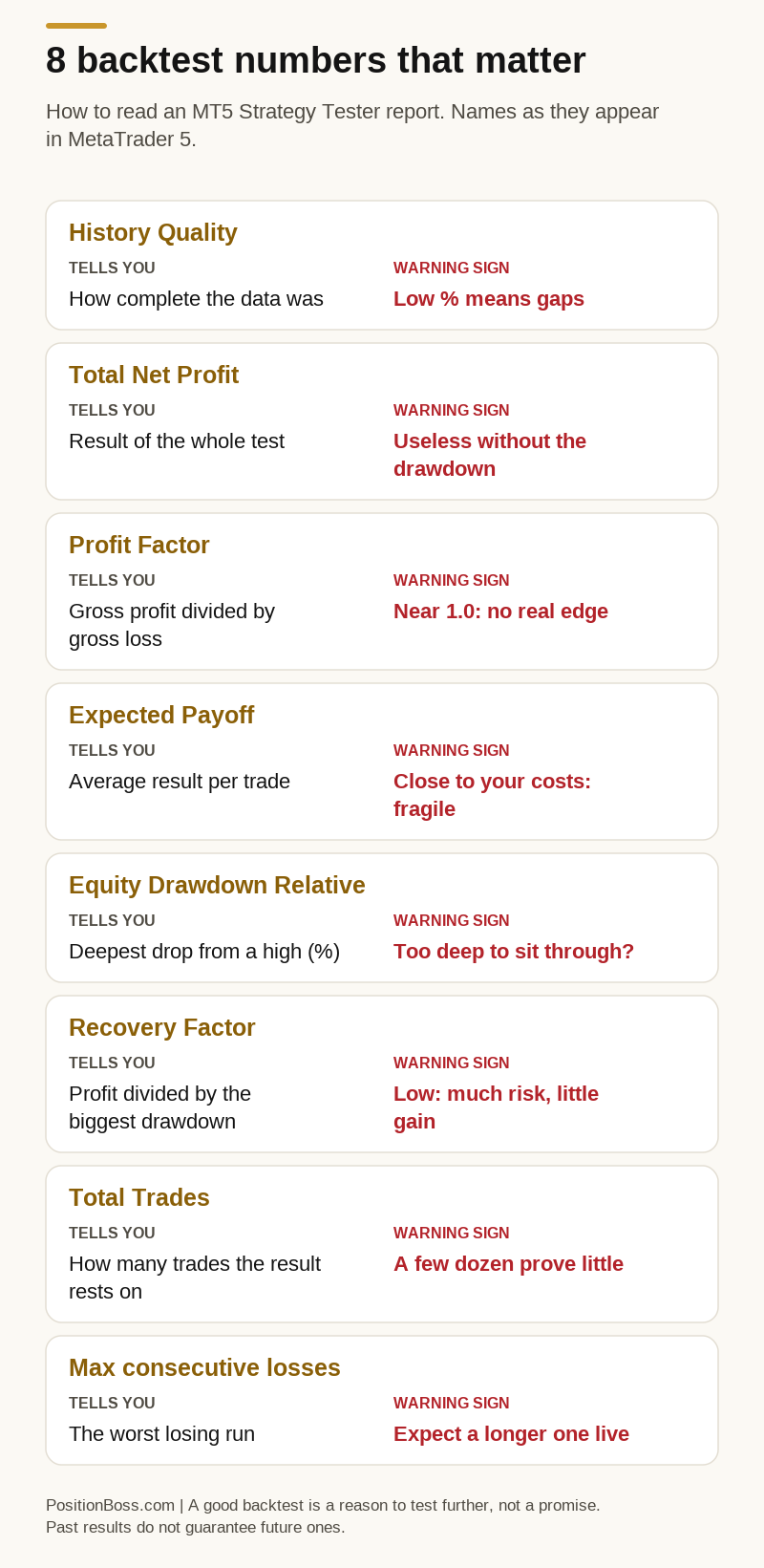
Then look at the Graph tab. A balance line that rises while the equity line keeps dipping far below it usually means losing trades are being held open, a typical grid or martingale pattern. Finally, open the Journal: it lists every order, change and message from the EA. Errors such as "invalid stops" or "not enough money" show problems you would also meet live.
Compare the forward part with the back part. If the result falls apart on the unseen third, the settings were probably tuned to the past.
Five traps that make a backtest look better than reality
- Generated ticks and no delay. Fine for a first look, misleading for gold scalpers.
- Over-optimization. Thousands of setting combinations will always produce one that looks perfect on the past. Prefer settings that work reasonably across a range of values.
- A short or calm period. One good quarter says nothing about a news-driven month.
- Costs left out. Missing commission or a spread that is lower than you really pay can turn a losing strategy into a winning one on paper.
- Balance instead of equity. Always read the equity drawdown. The balance only changes when trades close.
How to test a trade manager (worked example)
A trade manager does not choose entries, so the question is different: does it carry out my plan exactly, on every trade? There is one practical problem. In the tester nobody can click the panel or open trades by hand, so a pure trade manager would just sit there.
Gold Position Manager solves this with a test mode. In the Strategy Tester it opens example trades by itself, BUY and SELL in turn (setting [1401], on by default), and manages them with your plan. On a live chart it never opens a trade by itself. Here is the full test, which you can repeat with the free demo:
- On the Gold Position Manager page on MQL5, click Free Demo. It appears under Navigator > Expert Advisors > Market.
- In the tester, choose it as the Expert, your gold symbol, Every tick based on real ticks, and switch Visualization on.
- In the Inputs tab, set the plan you want to check, for example a stop loss of 50 pips [401], TP1 at 10 pips closing 30% [501, 502], TP2 at 20 pips closing 30%, TP3 at 30 pips closing the rest, and break-even after TP1 with +1 pip [701, 704].
- Press Start and watch the chart: the stop loss appears as soon as each trade opens, each step closes its part, and the stop moves to break-even after TP1.
- Open the Journal: every action is written with its price, so you can check each step against your plan.
- Change one setting, such as the break-even rule, and run again to see the difference.
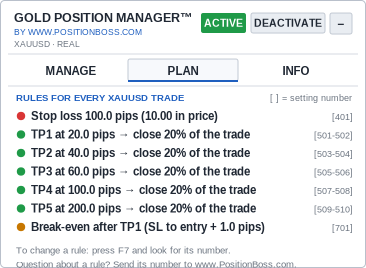
Keep in mind what this test shows: that the exits follow your rules. The example trades are random entries, so their profit or loss says nothing about your own trading. That part comes from your entries.
Watching a few hundred example trades in the tester is the fastest way to understand what a trade manager will do with your real trades: where the stop goes, how much each step books, when break-even happens. If it does not match what you want, you have lost nothing. If it does, the gold scalping trade manager guide shows how traders use it live.
After the tester: demo, then small
- Forward test on a demo account at your broker for a few weeks. This is the first test with live spreads and fills.
- Compare demo with backtest for the same weeks: number of trades, average result, worst loss.
- Go live with the smallest size and read the Experts log daily for the first weeks.
For robots, add one more check: a long live record, ideally a public one. See gold trading bots: what to check before you trust one.
Questions about the MT5 Strategy Tester
Can I test a paid EA before buying it?
Usually yes. Most Expert Advisors on the MQL5 Market have a free demo. It runs only in the Strategy Tester, not on a live chart, which is exactly what you need to test it.
Which modelling mode is the most accurate?
"Every tick based on real ticks", because it replays the ticks your broker recorded, including the spread. It is slower and needs a tick download the first time, but for gold it is the closest to live trading.
Why is my live result worse than the backtest?
The usual reasons are higher spreads and slippage live, missing commission in the test, delays the test did not include, a period that does not match today's market, and settings tuned too closely to the past. Test with real ticks and a random delay to narrow the gap.
How long should a backtest be?
Long enough to include different market conditions: for most gold EAs at least one to two years, with a forward part the EA has not been tuned on. The number of trades matters as much as the length: a few dozen trades prove little.
My EA makes no trades in the tester. What is wrong?
Check the Journal first. Common causes are a wrong symbol name, a period without data, an EA that needs settings you did not enter, or a trade manager that waits for manual trades. Gold Position Manager opens example trades in the tester for this reason (setting [1401]).
Can I run the Strategy Tester on my phone?
No. The tester is part of the MT5 desktop program on Windows. You can run it on a Windows VPS if you do not have a Windows PC.
Sources
- MetaTrader 5 Help: Strategy Tester settings
- MetaTrader 5 Help: tick generation modes
- MetaTrader 5 Help: the testing report
- MetaTrader 5 Help: buying and demo versions in the Market
This guide is education, not financial advice. Backtests replay the past and cannot promise future results. Trading gold carries a high risk of loss.