Key points
- Most Expert Advisors on MQL5 have a free demo that runs only in the Strategy Tester. Use it before you pay.
- A purchase comes with at least 5 activations, one used at purchase. An activation ties the copy to one computer and its operating system, not to a trading account.
- Rent (1, 3, 6 or 12 months, as the seller offers) is a real-account trial. When it ends, the EA stops and leaves the chart.
- Market purchases cannot be returned, so the checks before paying matter. A 10-point list is below.
What the MQL5 Market is
MQL5.com is run by MetaQuotes, the company behind MetaTrader. Its Market is built into MT5 itself (the Market tab in the Toolbox) and is also available on the website. Sellers upload their programs, MetaQuotes checks them before publishing, and buyers pay through their MQL5 account.
For you as a buyer, this has practical advantages over buying an EA file from a random website:
- Protected copies. Each purchase is compiled for your computer, so there is no file to lose or share by mistake.
- Free updates for products you bought, installed when you choose.
- A free demo for most Expert Advisors, to test in your own Strategy Tester.
- Public reviews and comments, and a Service Desk if you cannot solve a problem with the seller.
Many search for an "MQL5 trading bot" or "MQL5 trading robot", but the Market sells several kinds of Expert Advisor: robots that trade by themselves, trade managers that look after your own trades, and utilities. Knowing which one you are looking at is the first check (see trading robot vs trade manager).
Free demo, rent or buy: how they compare
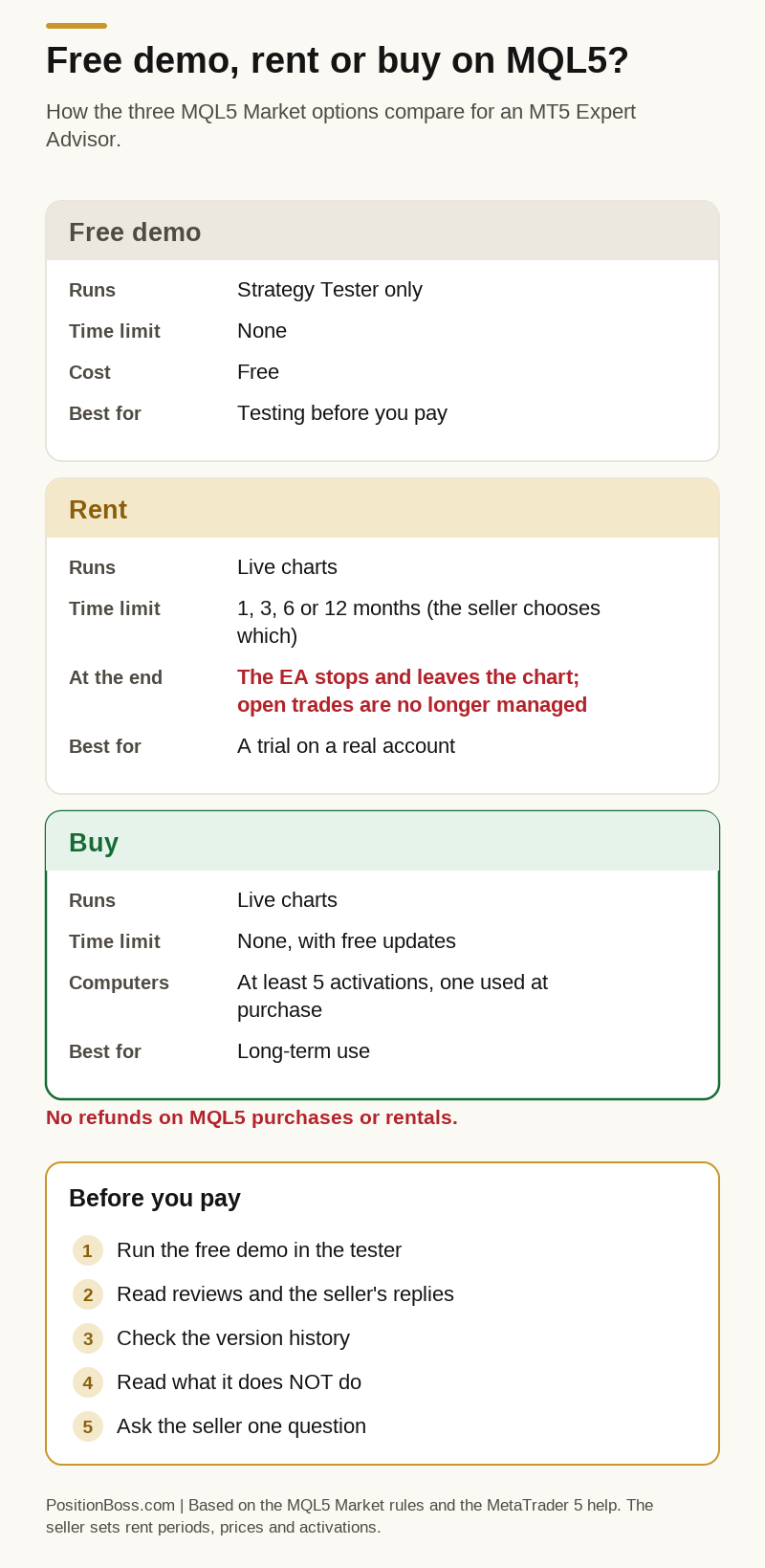
Free demo
The demo is the full program, limited to the Strategy Tester: it cannot run on a live chart. That is exactly what you need to check how an EA behaves. Our guide shows how to test an Expert Advisor in the MT5 Strategy Tester step by step.
Rent
Renting runs the EA on live charts for the period the seller offers. It is a sensible way to try an EA on a real account before committing. Remember what happens at the end: the EA stops and is removed from the chart, and MT5 reminds you in its log before that day. Any trades it was managing are then on their own, with only the orders already at your broker, such as the stop loss, still working. You can renew early without losing the remaining time.
Buy
A purchase has no end date and includes free updates. It comes with the number of activations the seller set, at least 5 including the first one. Buying is usually cheaper than renting if you will use the EA for a long time.
Activations explained
Activations confuse many buyers, so here is how they work according to the MetaTrader help:
- An activation ties a copy to one computer and its operating system, not to a trading account and not to one MT5 installation.
- On an activated computer you can run the EA in several MT5 terminals and on several accounts.
- A new computer, a VPS or a reinstalled operating system needs a new activation.
- Removing the EA does not give an activation back.
So for most traders, 5 activations cover a home PC, a laptop and a VPS, with a couple left for a new PC or a reinstall. If you run several accounts on one VPS, that VPS uses one activation (see gold scalping on several MT5 accounts).
How to buy, step by step
- Create an MQL5 account on mql5.com if you do not have one.
- Add it to MT5: Tools > Options > Community, then enter your MQL5 login.
- Find the product on the website or in the Market tab inside MT5, and try the Free Demo first.
- Pay with your MQL5 balance or a payment method shown at checkout.
- Install it from the Market tab (Purchased). It appears under Navigator > Expert Advisors > Market.
- Attach it to a chart, allow Algo Trading, and set it up on a demo account first (see how to install an EA in MT5).
10 checks before you pay for any EA
- Run the free demo in the Strategy Tester with real ticks, on your broker's gold symbol.
- Read what it does not do. An honest description states its limits: symbols, account types, what stops when MT5 is off.
- Look for promises. "Never loses", "guaranteed" or fixed monthly returns are red flags (see the 8 red flags of trading bots).
- For robots, find a live record, ideally months of a public, verified signal, and compare its drawdown with what you could stand.
- Read the reviews and the seller's replies. How a seller handles a problem tells you more than five-star praise.
- Check the version history. Regular, explained updates show an active seller.
- Check the settings are explained. You should understand every setting you change.
- Check the permissions. Most EAs do not need DLL imports. Never give anyone your trading password.
- Compare rent and buy for the time you expect to use it, and check the number of activations.
- Ask the seller one question by private message before buying. A clear, quick answer is a good sign.
An example listing: how we set up our own
We sell Gold Position Manager, a trade manager for XAUUSD, on the MQL5 Market, so here is how its listing answers the checks above. Use it as an example of what to look for in any product, including ours:
| Check | Gold Position Manager |
|---|---|
| Free demo | Yes. In the tester it opens example gold trades by itself (setting [1401]) so you can watch the stop loss, each profit step and the break-even. |
| Rent or buy | Rent 6 months for $30 or 1 year for $50, or buy for $149. |
| Activations | 20, whether you rent or buy. |
| What it does not do | No signals, no trades of its own on a live chart, no work while MT5 is off. Stated on the page. |
| Promises | None. It carries out your rules and says so. |
| Permissions | Algo Trading only. No DLL, no password. |
| Settings | Every setting has a fixed number and a plain description, so a question is easy to ask. |
One point from the rent section matters for any trade manager: when a rental ends, the program stops managing your open trades. Gold Position Manager keeps the stop loss of every trade at your broker, and can also leave the last take profit there (setting [801]), so trades are never left completely unprotected; the remaining profit steps and break-even stop until the EA runs again.
Refunds and problems
The MQL5 Market rules say that products bought through the Market cannot be returned. That is why the demo and the checks above matter so much. If something does not work as described, write to the seller first; requests for corrections can be made within a month of purchase. If you cannot agree, the MQL5 Service Desk can look at the case.
Questions about buying on MQL5
Is it safe to buy an Expert Advisor on the MQL5 Market?
Buying through the official Market is safer than buying files from unknown websites: products are checked before publishing, copies are protected, updates are free and there is a dispute process. It does not guarantee that an EA is profitable or right for you, so test the free demo first.
What is the best trading robot on MQL5?
There is no single best robot. Results depend on the strategy, the market period, your broker's costs and your risk. Look for honest descriptions, a long live record, a stop loss on every trade, clear settings and an active seller, and test the demo yourself.
Can I get a refund on MQL5?
Market purchases cannot be returned under the MQL5 rules. Contact the seller if the product does not work as described; unresolved cases can go to the MQL5 Service Desk.
How many computers can I use a purchased EA on?
As many as your activations allow: at least 5, including the one used at purchase. Each activation covers one computer and its operating system, where you can run the EA in several MT5 terminals and accounts.
What happens to my trades when a rented EA expires?
The EA stops and leaves the chart, so it no longer manages your open trades. Orders already at your broker, such as the stop loss, keep working. Renew before the end date if you want it to keep running.
Should I rent or buy?
Rent for a trial on a real account or a short need; buy for long-term use, where it usually costs less overall. Always try the free demo first.
Sources
- MQL5 Market rules (activations, demo versions, returns, updates)
- MetaTrader 5 Help: how to buy a product
- MetaTrader 5 Help: how to rent a product
This guide is education, not financial advice. Prices and terms on the MQL5 Market are set by each seller and can change. No Expert Advisor can guarantee a profit. Trading gold carries a high risk of loss.