Trade Manager, the last tool on this list, is ours. To keep the comparison fair, every fact about the other five comes from their own official page, checked on 18 November 2026, and we say plainly where ours is weaker. Prices and features change, so check the links before you buy.
Key points
- There is no single best MT5 trade manager. Pick by the jobs you need done, not by the longest feature list.
- Two free choices stand out: Position Sizer (open source, strong on lot sizing) and the free tools some brokers give their clients.
- If you want many trailing types, hidden stops and equity protection, a paid tool such as InvestSoft's Forex Trade Manager lists all three.
- Whatever you choose, test it on a demo account first. One hour tells you more than any review.
What is the best trade manager for MT5?
There is no single best trade manager for MT5. The best one for you sizes lots from your risk on every symbol you trade, handles exits the way you trade, guards your account in the ways you need, works with your broker and phone, and lets you test it before you pay.
A trade manager does not pick trades for you. It carries out your plan: the lot size, the stop, the exits, the limits. So the right question is not "which is best?" but "which does my plan need?"
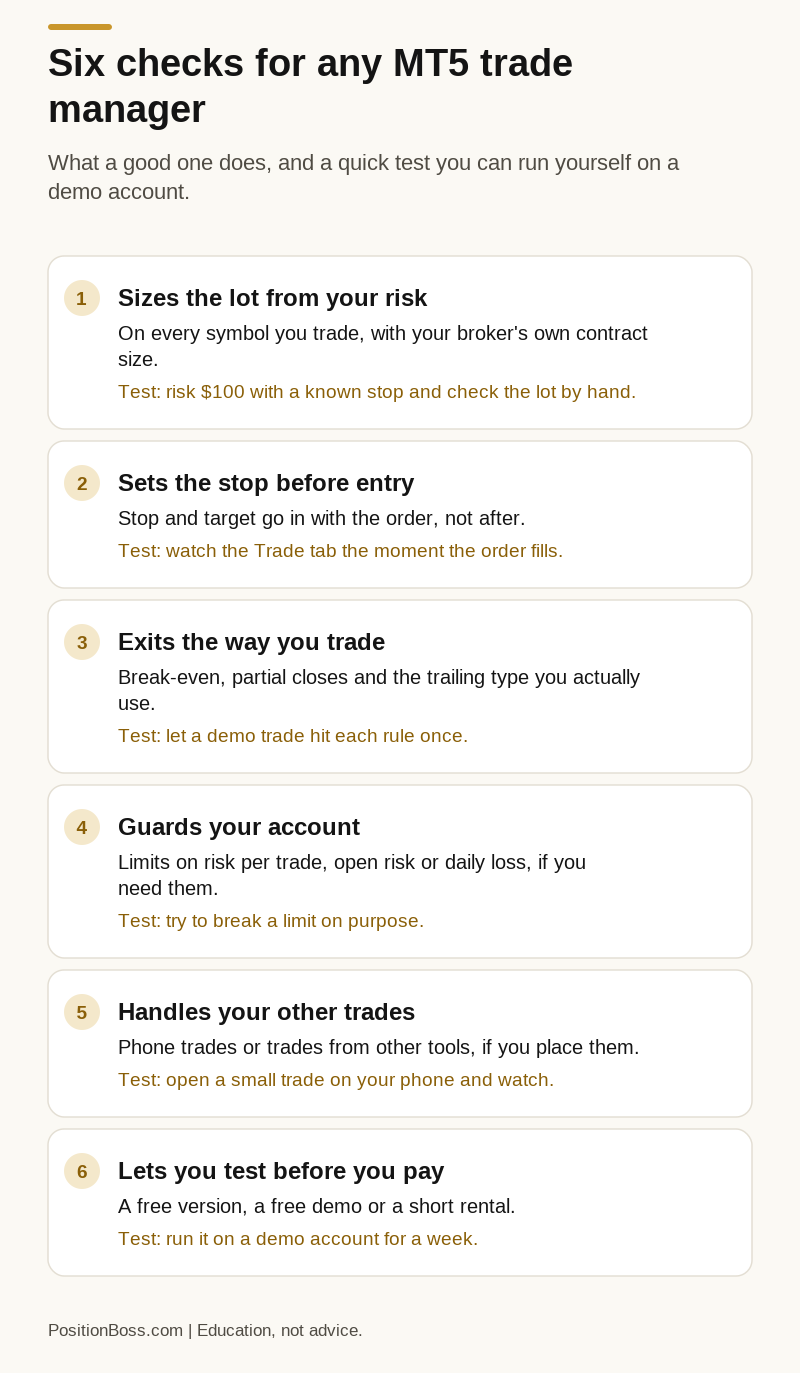
The six tools, one by one
1. Position Sizer (EarnForex)
Price: free and open source. Platforms: MT4 and MT5 (version 3.17, 9 November 2026).
Position Sizer is a well-known free tool, and lot sizing is its heart. You set the risk as a percentage or as money, drag the entry, stop and target lines on the chart, and it works out the lot, with commission, margin and portfolio risk on their own tabs. Stops can be set as a multiple of ATR, and one position can be split into several trades with different take-profit levels.
It can open the trade with one click or a hotkey, and its Trading tab has inputs for a break-even and a trailing stop in points for its own trades. Best for: traders who mainly want exact lot sizes, for free, on MT4 or MT5.
2. Forex Trade Manager MT5 (InvestSoft)
Price: $99 to buy or $30 to rent for 3 months, with a free demo. Platform: MT5 (version 3.70, 18 June 2026). It had 773 reviews on the MQL5 Market when we checked.
Its page lists the widest set of exits here. Break-even comes in basic, multi-level and group forms. The trailing stop has six kinds: basic, multi-level, highs and lows, moving average, ATR and partial-close trailing.
It also lists lot sizing from risk or a fixed cash amount, a hidden mode for stops, take profits and pending orders, equity protection that closes trades at a set profit or loss, and stops and targets for trades opened on the MT5 phone app. Best for: traders who want many automatic exit styles and are happy to pay.
3. XP Forex Trade Manager MT5 (MQL TOOLS SL)
Price: free. Platform: MT5 (version 6.0, 14 January 2025).
A simple, free helper for trades you open by hand. Its page says it sets a stop loss and take profit on new orders automatically, moves the stop to break-even, trails it, and can hide stops and targets from the broker. It can manage only the chart's symbol or every open trade, and it shows the day's profit or loss on the chart.
Its page does not list lot sizing from risk or partial closes. Best for: traders who want free automatic stops, break-even and trailing on manual trades.
4. MetaTrader Supreme Edition (Admirals)
Price: free for Admirals live and demo accounts. Platforms: MT4 and MT5.
A broker plug-in with a lot of tools in one box. Its Mini Terminal opens orders with a preset stop, target and trailing stop, has a lot-size and margin calculator, and uses smart lines for partial closes and multiple or time-based stops. The Trade Terminal adds trade management across several symbols and alerts on the account, and the Trade List can move winning trades to break-even or close all losing ones.
Best for: traders who already have, or are happy to open, an Admirals account.
5. FX Blue apps (Mini Terminal and its sister apps)
Price: given free by some brokers to their clients. For example, OANDA offers FX Blue's MyTrader App Suite for MT5 free on every live and demo account. Platforms: MT4 and MT5, depending on the broker.
FX Blue's Mini Terminal has pop-up calculators, including the lot size for a cash risk at a given stop. It sets stops, targets and a trailing stop in pips, and its Smart Lines turn a line on the chart into a stop or a target, with partial closes at different prices. Which apps you get depends on your broker, so read your broker's list.
Best for: traders whose broker already includes FX Blue's apps.
6. Trade Manager (PositionBoss, our tool)
Price: a free version from our site; PRO on the MQL5 Market at $30 for 6 months, $50 for a year or $149 to buy, with a free demo. Platform: MT5.
The free version sizes the lot from your risk in % or money on any symbol, from lines that show the price, pips, money, % and R. It splits a trade into up to ten take profits, shows costs before you trade, blocks a trade that breaks one of 13 safety rules, and keeps a journal with win rate, profit factor and drawdown.
PRO adds break-even (which can pay the commission), a fixed-distance trailing stop, partial closes and stop moves for many trades at once, the option to manage phone trades, and signals to Telegram, Discord, webhooks and your phone. Best for: traders who want sizing, a journal and trade signals in one panel, starting free.
The six tools side by side
"Not listed" means the tool's own page does not mention it, not that it is missing for sure. Check with the seller if you need it.
| Tool | Price | Lot size from risk | Exits listed | Account guards listed | Phone trades |
|---|---|---|---|---|---|
| Position Sizer | Free, open source | Yes, % or money | Several take profits at entry, break-even, trailing | Portfolio risk and margin shown | Not listed |
| Forex Trade Manager MT5 | $99, or $30 for 3 months | Yes, risk or cash amount | Partial close, multi-level break-even, 6 trailing kinds | Equity protection, hidden mode | Yes, sets stops on them |
| XP Forex Trade Manager | Free | Not listed | Auto stop and target, break-even, trailing | Hidden stops, daily P/L shown | Manual trades, yes |
| Supreme Edition | Free with Admirals | Lot-size calculator | Trailing, smart-line partial closes, break-even from the Trade List | Account alerts | Not listed |
| FX Blue apps | Free from some brokers | Calculator for a cash risk | Trailing in pips, Smart Lines partial closes | Depends on the apps | Not listed |
| Trade Manager | Free; PRO from $30 | Yes, % or money, from the lines | Up to 10 take profits; PRO: break-even, fixed trailing | 13 rules that block a trade | PRO, if switched on |
And MT5 on its own?
Before you add any tool, know the baseline. MT5 itself is free and sets a stop and a target with the order, closes part of a trade by hand, and has one trailing stop that keeps a fixed distance and only runs while MT5 is open. Its History tab report shows profit factor and drawdown.
What it does not do is work out the lot from your risk, split a trade into several targets for you, or move a stop to break-even by itself. Every tool above exists to fill those gaps; our complete guide to MT5 trade management shows how to do each job by hand first.
Which one fits you?
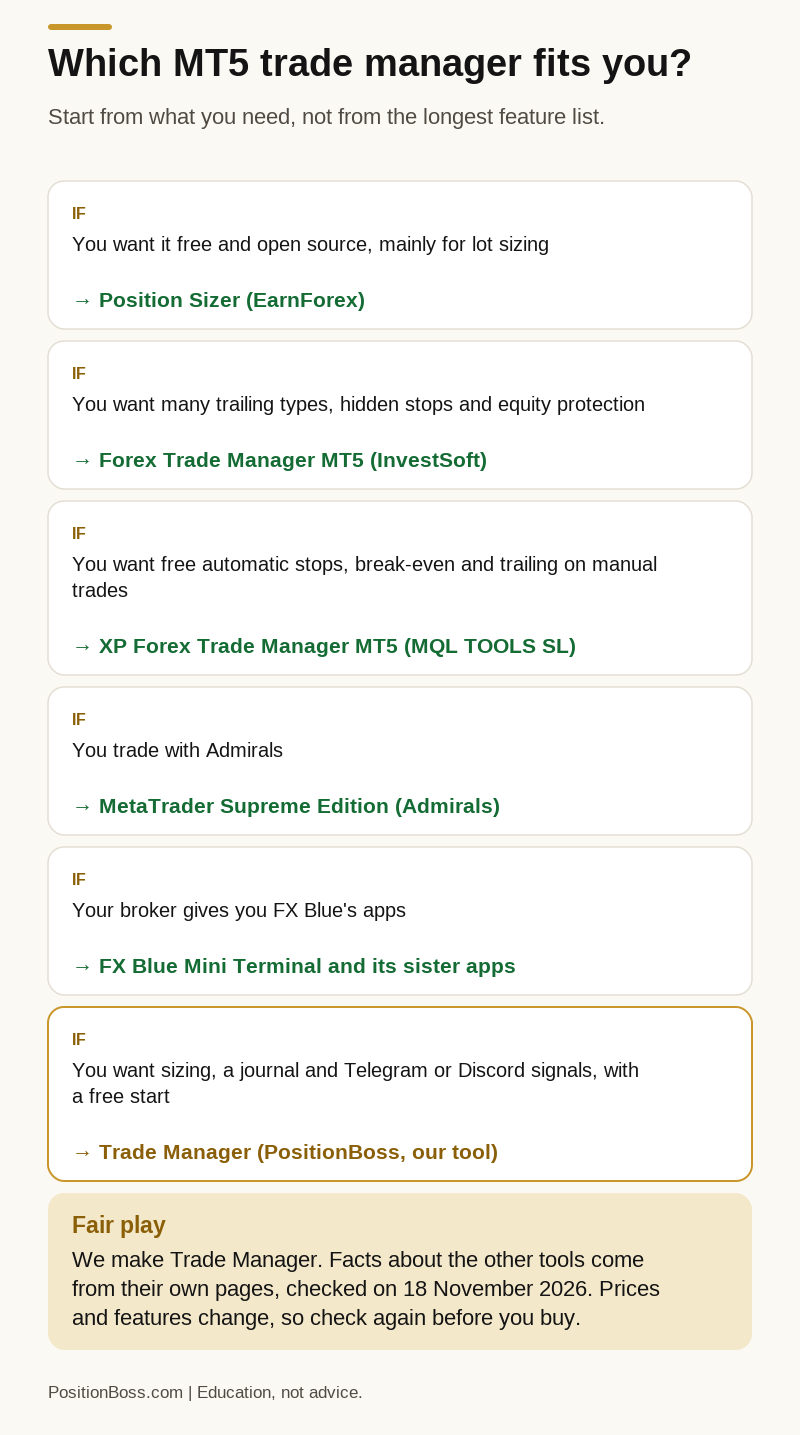
Two questions settle most choices. Do you need many automatic exit styles, or mainly exact lot sizes? And does your broker already give you a free tool?
Answer those, and you are down to one or two candidates to test.
Where our Trade Manager is stronger, and where it is weaker
Since we make it, here is the plain list.
- Stronger: a free version that already does sizing, ten take profits, costs, 13 safety rules and a journal; every line shows money, % and R; and PRO posts your trades to Telegram and Discord, something no other tool here lists.
- Weaker: it runs on MT5 only; it has one trailing type (a fixed distance); it has no hidden stops; and its rules block new trades but never close open ones, so it has no equity protection that closes trades.
- Newer: it is a young product with few reviews so far, so the free version and the PRO demo are the best way to judge it.
How to test any trade manager in one hour
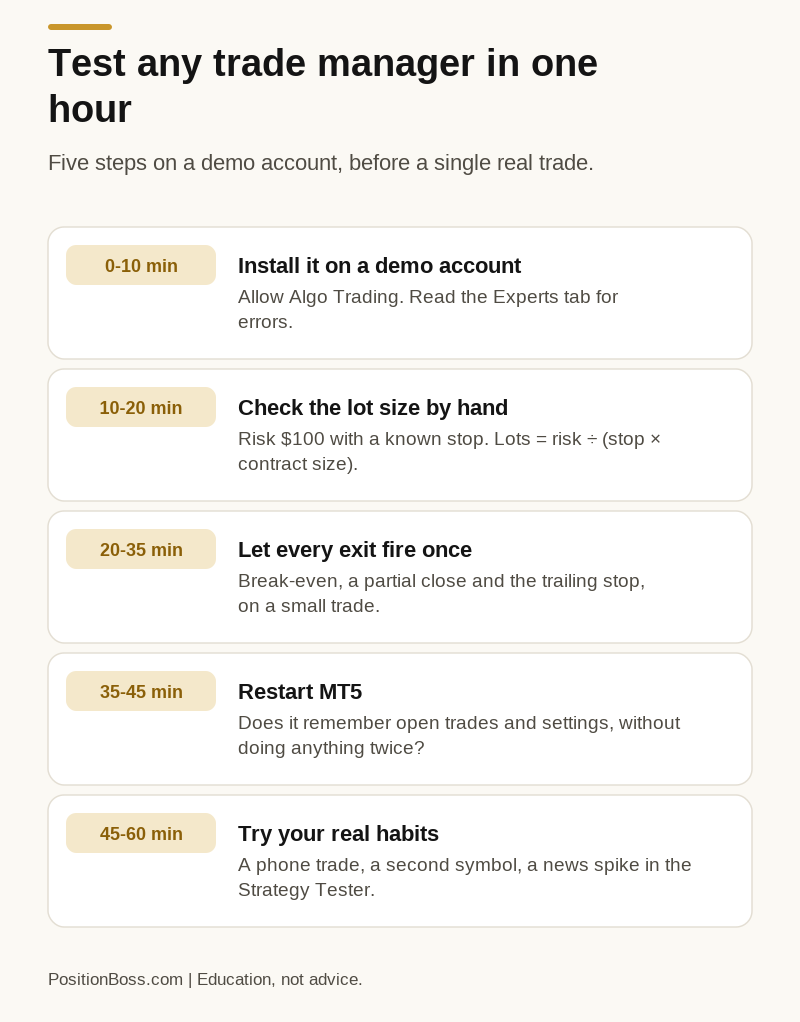
The lot check is the most important step. Use the formula from our guide on how to calculate lot size: if the tool's lot and yours differ, find out why before you go live. For the Strategy Tester part, our guide to testing an EA in MT5 walks you through it.
Red flags in any trade manager listing
- Profit promises. A trade manager carries out your plan; it cannot promise results.
- No way to try it. No free version, demo or short rental is a reason to wait.
- Asks for your password. A trade manager runs inside your MT5 and never needs your trading password.
- Hidden stops without a warning. Hidden stops live in your MT5, not at your broker. If MT5 closes, they stop working, so a good page tells you that.
Summary
The best MT5 trade manager is the one that does the jobs your plan needs. Position Sizer is a strong free choice for lot sizing, InvestSoft's Forex Trade Manager lists the most exit styles, XP Forex Trade Manager adds free automatic stops, and Admirals and FX Blue tools come free with some brokers. Our Trade Manager starts free and adds a journal and signals; whichever you pick, give it one honest hour on a demo account first.
Questions
Is there a free trade manager for MT5?
Yes. Position Sizer is free and open source, XP Forex Trade Manager is free, our Trade Manager has a free version, and some brokers, such as Admirals and OANDA, give their clients free trade-management tools.
What is the best trade manager for prop firm traders?
One that caps the risk of each trade and of all open trades, and fits your firm's daily loss rule. Read the firm's rules first, then check which limits the tool really enforces and whether it blocks new trades or closes open ones.
Are hidden stop losses safe?
They only work while MT5 is running and connected, because they live in your platform instead of at your broker. If you use them, run MT5 on a VPS and keep a real stop further away as a backup.
Does a trade manager need MT5 to stay open?
Yes, for anything it does by itself, such as break-even or a trailing stop. Stops and targets already at your broker keep working when MT5 is closed.
Can a trade manager open trades on its own?
A trade manager is not a trading robot: it acts on trades you decide to take. Some can add a stop or move it automatically, but the decision to enter is yours.
Sources (checked 18 November 2026)
- EarnForex: Position Sizer
- MQL5 Market: Forex Trade Manager MT5 (InvestSoft)
- MQL5 Market: XP Forex Trade Manager MT5 (MQL TOOLS SL)
- Admirals: MetaTrader Supreme Edition
- FX Blue: Mini Terminal and OANDA: MyTrader App Suite by FX Blue
- MQL5 Market: Trade Manager Pro by PositionBoss and Trade Manager (free version)
This guide is education, not financial advice. We make Trade Manager; the other tools are described from their own pages and we have no business ties with their makers. Trading forex, gold and indices with leverage carries a high risk of losing money, and no tool removes that risk.