Key points
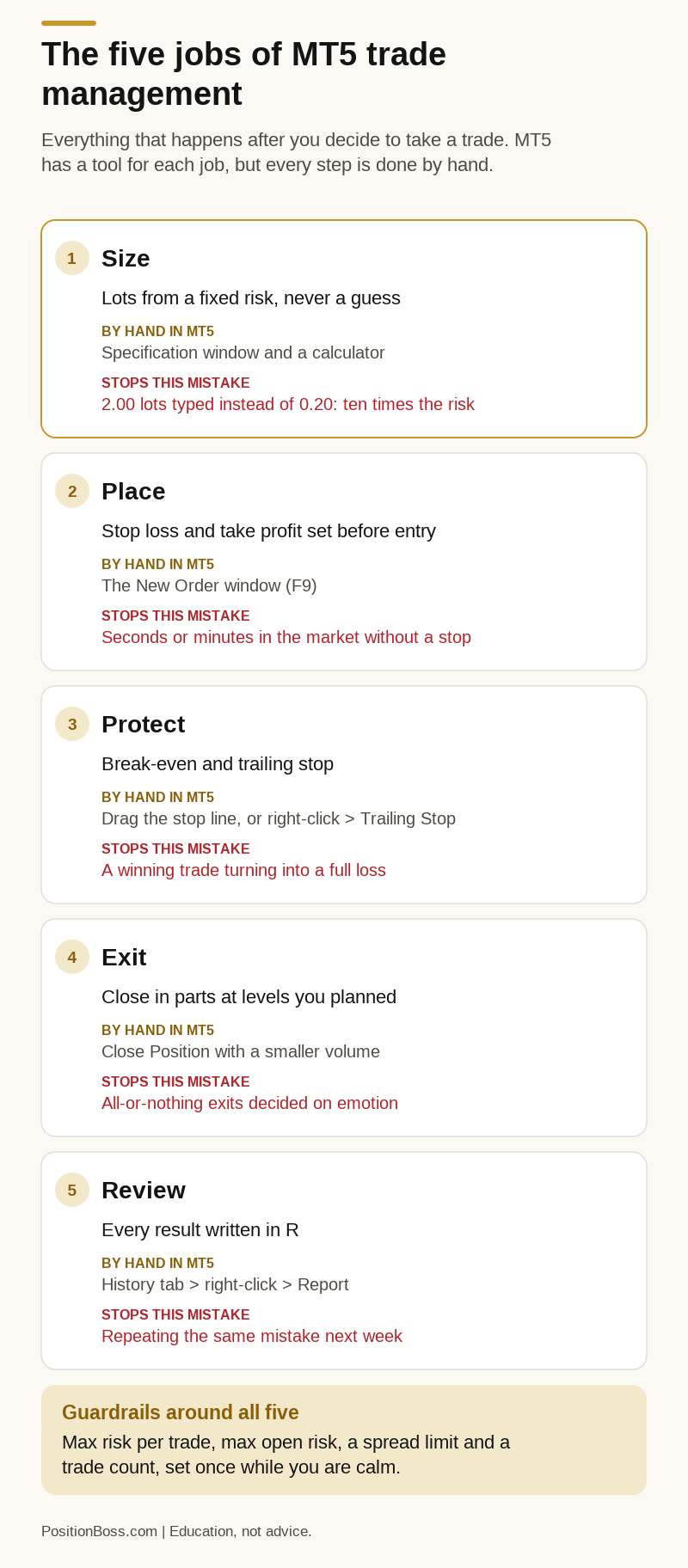
- Trade management is five jobs: size, place, protect, exit and review, with guardrails around all five.
- Lot size = risk ÷ (stop distance × contract size). The contract size differs between EURUSD, gold and US30, and even between brokers for the same symbol.
- MT5's own trailing stop runs in your platform, not at the broker. It stops working when MT5 is closed.
- Judge results in R, multiples of the risk you planned. A 40% win rate with 2R winners and 1R losers earns about +0.2R per trade before costs.
What is MT5 trade management?
MT5 trade management is everything you do with a trade after you decide to take it: sizing the lot from a fixed risk, placing the stop loss and take profit, protecting the trade with break-even or a trailing stop, closing it in planned parts, and reviewing the result in R.
Your entry decides whether a trade can work. Management decides what it costs when it doesn't, and how much you keep when it does. Two traders with the same entries can finish a month far apart because of these five jobs alone.
Five expensive mistakes MT5 lets you make
MetaTrader 5 is very good at sending orders. It is not built to stop you from sending the wrong one. Each of these mistakes takes a second to make and can cost far more than one bad trade.
1. One typo in the volume box
On gold, with a stop 50 pips away, 0.20 lot risks $100 and 2.00 lots risk $1,000. MT5 accepts both, as long as you have the margin. Nothing in the order window tells you what you are about to risk.
2. "Points" that mean different things
In MT5, a point is the smallest price step of a symbol, so its size depends on how many decimals your broker quotes.
Take a $100,000 prop account risking 1% ($1,000) with a gold stop of 250 points. On the common two-decimal gold quote, 250 points is a $2.50 move and the right size is 4.00 lots. If your gold symbol has three decimals, 250 points is only $0.25 and the same sum gives 40.00 lots.
That is ten times the size, from a setting you never chose, so check the Digits field before you count in points. Indices add a second trap: traders say "points" for whole index points, while MT5 counts its smallest step. On a US30 quote with two decimals, a 150-point stop in trader talk is 15,000 points in MT5.
3. A stop added after the entry
The One Click Trading panel on the chart sends a market order with only a volume. The stop loss goes on afterwards, and the trade is unprotected while you set it. On a fast news candle, those seconds are enough to lose more than you planned.
4. Forgetting the spread
For forex and CFD symbols, MT5 draws its charts from the Bid price. A buy closes at the Bid, but a sell closes at the Ask, so a sell's stop loss is triggered by the Ask, a price the chart does not show by default. To see it, press F8, open the Show tab and tick Show Ask price line.
Example: gold sold at 4150.00 with a stop at 4151.00. With a 0.20 spread, the Bid must climb to 4150.80 to hit the stop. If the spread widens to 0.80, as spreads can in quiet hours or around news, a Bid of 4150.20, just 2 pips higher, is enough.
5. A "break-even" stop that still loses
Say your broker charges $3.50 per lot per side on EURUSD, so $7.00 per lot for the round trip. Move the stop exactly to the entry, and a 0.40 lot trade that comes back closes at -$2.80, not zero. A stop 0.7 pip past the entry pays the commission: 1.08507 instead of 1.08500 on a buy.
Job 1: size every trade from your risk
Decide the risk first, in money: 1% of a $10,000 account is $100. Then place the stop where your trade idea is proven wrong, not where the loss feels comfortable. Only then work out the lot size.
Lots = risk ÷ (stop distance × contract size)
This is MT5's own profit formula turned around: for forex and CFD symbols, the MQL5 documentation gives profit as price change × contract size × lots, in the symbol's profit currency. Find the Contract size in MT5: press Ctrl+M for Market Watch, right-click the symbol and choose Specification. Note the Digits, Minimal volume and Volume step there too.
The same window shows tick size and tick value, which give the same answer. Some brokers show 0 in those two fields for CFDs, so contract size is the safer field to read.
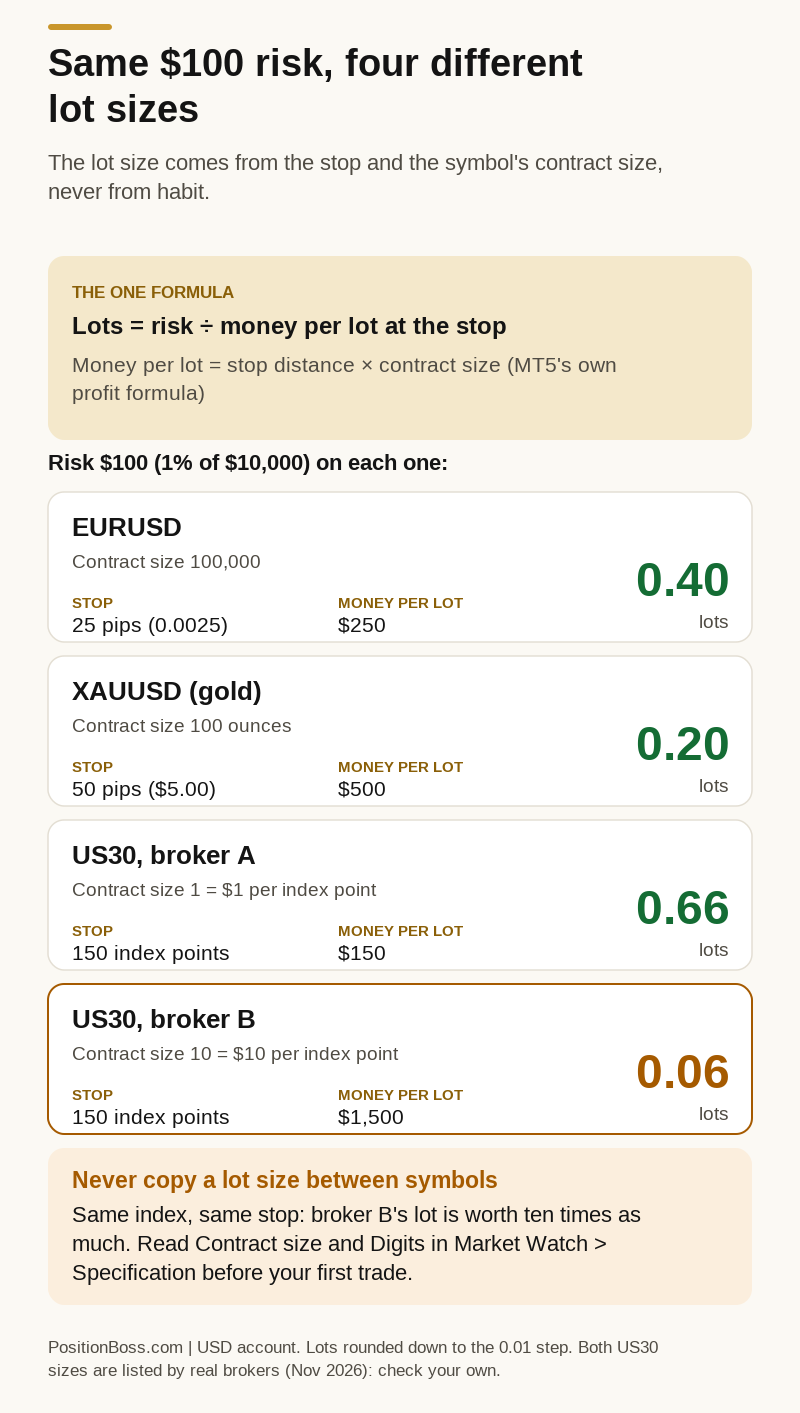
- EURUSD (contract size 100,000): one pip is 0.0001 × 100,000 = $10 per lot. A 25-pip stop is 0.0025 × 100,000 = $250 per lot, so $100 of risk buys 0.40 lot.
- Gold, XAUUSD (contract size 100 ounces, the common size; some accounts use others): a 50-pip stop, counting 0.10 as one pip, is a $5.00 move, and $5.00 × 100 = $500 per lot. The size is 0.20 lot. Pips on gold are counted in different ways, which our XAUUSD pip value guide explains.
- US30 with contract size 1 ($1 per index point per lot): a stop 150 index points away costs $150 per lot, so 0.666 lot, rounded down to 0.66.
- US30 with contract size 10 ($10 per index point per lot): the same stop costs $1,500 per lot, so 0.06 lot. If a broker's minimum were 0.10 lot, the smallest trade would risk $150, and the honest choice is to skip it.
Both US30 sizes are real: in November 2026 Tickmill listed a US30 contract size of 1 and Eightcap listed 10. Brokers can change these, so always read your own Specification window.
Always round down to the volume step. Rounding 0.666 up to 0.67 risks $100.50 instead of $100: small once, but on a prop account a rounding habit can break a rule. All four symbols here pay profit in US dollars; if your account is in another currency, convert at today's rate.
Yen pairs, crosses such as EURGBP and accounts in other currencies need one more step, explained in our guide on how to calculate lot size. For gold only, our free gold lot size calculator does this sum in your browser.
Job 2: place the stop loss and take profit before entry
Press F9 for the New Order window, choose the symbol and the volume, and type the Stop Loss and Take Profit before you click Buy or Sell. MT5 sends them with the order. If your broker rejects a stop sent with a market order, add it straight after the fill.
Two limits matter here. Stops level, in Specification, is the band around the current price, in points, inside which you cannot place a stop loss, take profit or pending order. The spread you usually see tells you how much room a tight stop really has.
- Hedging accounts: every trade keeps its own stop loss and take profit, so you can hold several trades on one symbol.
- Netting accounts: MT5 keeps one position per symbol. A second buy is added to the first, its stop loss and take profit replace the old ones, and they cover the whole position. Our MT4 vs MT5 guide shows both account types side by side.
- Either way: an MT5 take profit closes the whole position at one price, which shapes your exit plan in Job 4.
Job 3: protect open trades with break-even and trailing stops
Break-even by hand: drag the stop loss line on the chart to the entry, or double-click the trade in the Trade tab, set the new Stop Loss and click Modify. Add the commission buffer from mistake 5, or your "free" trade still costs money.
When to move it: a common rule is at +1R, once the trade has made as much as you risked. Earlier moves get stopped out by normal noise more often, and later moves give back more profit. Pick the rule before the trade, because a decision made while price is moving is rarely your best one.
MT5's trailing stop: right-click a position in the Trade tab, choose Trailing Stop and pick a distance. It starts once the profit in points reaches that distance. MetaTrader 5's help is clear about the catch: it runs in your platform, not on the broker's server, so it stops when MT5 is closed, and only the stop level it already set stays at the broker.
It also moves at most once every 10 seconds per position, and each position can have only one.
A fixed distance is the simplest way to trail. Other traders follow swing lows, a moving average or volatility, each with its own trade-off; our guide to trailing stops in MT5 compares five of them on the same trade.
To keep any trailing stop running overnight, MT5 must stay on, on your PC or a VPS (see do MT5 EAs work when your computer is off?). For gold, our break-even guide for XAUUSD goes deeper.
Job 4: exit in parts, at levels you planned
Because an MT5 take profit closes everything at one price, closing in parts needs one of three methods. You can close part of the trade by hand (Close Position with a smaller volume), open the idea as several trades with their own targets, or let a program close each part. The steps are in our guide to partial closes in MT5.
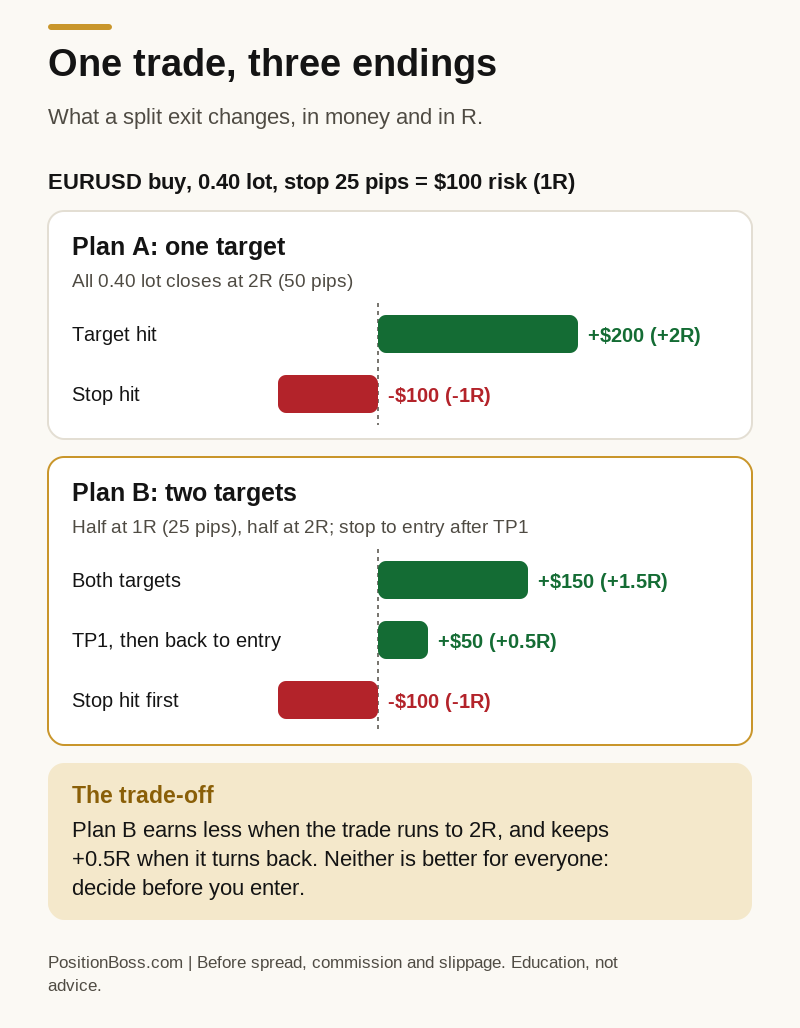
Take a EURUSD buy of 0.40 lot with a 25-pip stop. Each pip is worth $4.00, so the stop costs $100, which is 1R. With one target at 50 pips, the trade ends at +$200 or -$100, nothing in between.
Now close half (0.20 lot) at 25 pips and the rest at 50 pips, moving the stop to the entry after the first target. Both targets give $50 + $100 = +$150 (+1.5R). If price turns after the first target, you keep +$50 (+0.5R), and if the stop comes first you lose $100 as before.
The lot rules decide what is possible. Half of 0.03 lot is 0.015, which a 0.01 volume step cannot split, so plan the number of parts with your lot size in mind.
Guardrails: limits you set before the market tests you
You can do all five jobs well and still sink an account by having too much open at once. Guardrails are limits you set while you are calm. The usual four are a maximum risk per trade, a maximum total open risk, a spread limit and a maximum number of trades.
Take a $100,000 prop account with a 5% daily loss limit, which is $5,000. Risking 1% per trade with at most three trades open puts $3,000 at risk if every stop is hit, which leaves $2,000 of room for slippage and a bad fill. Firms define the daily limit in different ways, for example what the day is measured from and whether open losses count, so read your firm's rule word for word.
In a fast market or across a weekend gap, a stop fills at the next available price, which can be worse than the level you set. Guardrails leave room for that.
Job 5: review every trade in R
R is a trade's result divided by the risk you planned. +$150 on a $100 risk is +1.5R, and a full stop is -1R. Measuring in R lets you compare a $10,000 account with a $100,000 account, and shows whether your rules work rather than how big your lots were.
Expectancy = win rate × average win − loss rate × average loss (in R)
A trader who wins 40% of trades at +2R and loses 60% at -1R earns 0.4 × 2 − 0.6 × 1 = +0.2R per trade. Over 100 trades at $100 risk, that is about +$2,000 before costs. The profit factor is 80R ÷ 60R = 1.33, and with 2R winners the break-even win rate is 33.3%.
MT5 has a built-in report: right-click in the History tab and choose Report. It shows profit factor, drawdown and more, in money. It cannot show R, because MT5 never knew the risk you planned, so a simple journal adds that column and one line on what you did well or badly; our guide to keeping an MT5 trading journal shows how.
One gold trade, start to finish
Here are all five jobs on one XAUUSD buy, on a $10,000 account with a 100-ounce contract and $7.00 commission per lot for the round trip.
- Size: risk 1% = $100. Entry 4150.00, stop 4145.00: a $5.00 move (50 pips) costs $500 per lot, so the size is 0.20 lot.
- Place: the stop and both targets go in with the order: TP1 at 4155.00 (+1R) for 0.10 lot and TP2 at 4160.00 (+2R) for 0.10 lot. On a hedging account that means two trades of 0.10 lot, each with its own target.
- Protect: after TP1 fills, the stop on the remaining 0.10 lot moves to 4150.07, not 4150.00. Those 7 ticks are worth $0.70 on 0.10 lot, exactly that half's commission.
- Exit: price turns and hits 4150.07. TP1 paid $50.00, the stop paid $0.70, and commission on 0.20 lot cost $1.40: net +$49.30.
- Review: +$49.30 on a $100 risk is +0.49R. The journal line reads "plan followed, TP2 not reached".
Had both targets filled, the trade would have made $148.60 after commission (+1.49R). Had the stop come first, it would have cost $101.40, not $100: commission comes on top of the risk you planned, which is why some traders size their lot from the risk after costs.
MT5 trade management by hand vs with an on-chart tool
Everything above works by hand, and doing it by hand a few times is the best way to understand it. The question is how much time and attention each trade costs you.
| Job | By hand in MT5 | With an on-chart trade manager |
|---|---|---|
| Lot size | Specification, a calculator, then type the volume | Worked out from the stop line and your risk, rounded down to the volume step |
| Stop and target | Typed in the order window, or dragged after the fill | Lines placed before the order, with money and pips shown on each |
| Costs | Ask line on, commission worked out yourself | Risk and reward shown before and after commission |
| Several targets | Several trades, or parts closed by hand | One plan with several take profits and the lots split between them |
| Break-even | Drag the stop when you notice +1R | Moved at a profit you set, commission included if you choose |
| Trailing stop | Built in; runs only while MT5 is open | Also runs only while MT5 is open, on a PC or a VPS |
| Guardrails | Self-discipline | Rules that block a trade that breaks a limit |
| Review | History report, in money | A journal with win rate, profit factor and drawdown |
If you place one swing trade a day, the manual way costs a minute and works well. If you trade the London and New York overlap, every second spent on a calculator is a second the price keeps moving. That is where an on-chart tool starts to pay for itself.
Where Trade Manager fits
We built Trade Manager for MetaTrader 5 around these five jobs. You drag the stop and target lines on the chart, and the panel sizes the lot from your risk in % or money, on any symbol your broker offers, using the contract details MT5 reports for that symbol. Each line shows its price, pips, money, % of the account and R.
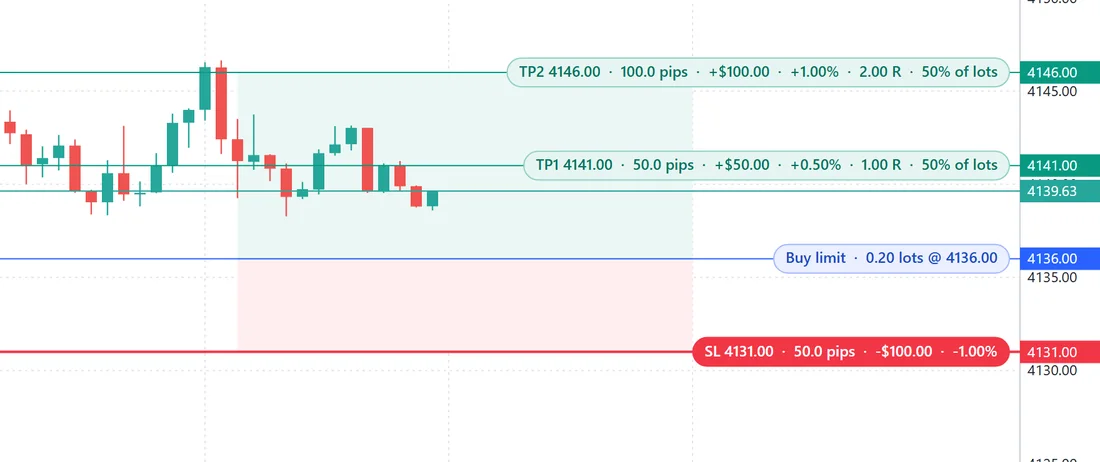
The free version plans and places the trade and keeps the journal. Up to ten take profits split the lots for you, a Costs view shows commission before you trade, 13 safety rules block a trade that breaks your limits, and the Journal shows win rate, profit factor and drawdown.
The PRO version adds the work on open trades: break-even, partial close and stop moves for many trades at once, plus automatic break-even and a trailing stop. Like MT5's own trailing stop, these run only while MT5 is open. You can get the free version, read the user guide first, or see how it compares in our comparison of six MT5 trade managers.
An MT5 trade management checklist for every trade
Tick it before you click Buy or Sell. It takes ten seconds, and it covers every mistake in this guide.
Ticked: of 8
Summary
MT5 trade management comes down to five jobs: size from a fixed risk, place the stop before entry, protect the trade, exit in planned parts and review every result in R. MetaTrader 5 can do each of them by hand, and that is the best way to learn them. When speed or consistency starts to cost you money, let a tool carry out the same rules for you.
Questions
How much should I risk per trade in MT5?
There is no single right number: choose a size at which a losing streak stays survivable and your account's limits stay safe. Risking 1% of the current balance, ten losses in a row cost about 9.6% of the account; at 5% per trade, they cost about 40%.
How do I calculate lot size in MT5?
Divide your risk in money by what one lot loses at your stop. That amount is the stop distance times the contract size, which you find in Market Watch > Specification.
Does MT5 have a built-in trade manager?
MT5 has the parts: stop loss, take profit, a trailing stop and partial closes by hand. It has no lot sizing from risk, no split take profits and no automatic break-even, so those need a calculator, manual work or an Expert Advisor.
Does the MT5 trailing stop work when my computer is off?
No. MT5 runs the trailing stop in the platform, not at the broker, so it stops with MT5 and only the stop level it already set stays active; keep MT5 running on your PC or a VPS.
Can a trade manager open trades by itself?
A trade manager is not a trading robot: it carries out the trades you decide to take. Trade Manager, for example, never opens a trade unless you click or press your trade shortcut.
Sources
- MetaTrader 5 Help: symbol specification (contract size, digits, stops level, volume step)
- MQL5 Reference: symbol properties and the profit formula for each calculation mode
- MetaTrader 5 Help: Bid and Ask, stop loss triggers, netting and hedging, trailing stop
- MetaTrader 5 Help: chart settings (Show Ask price line)
- MetaTrader 5 Help: One Click Trading
- MetaTrader 5 Help: keyboard shortcuts (F8, F9, Ctrl+M)
- MetaTrader 5 Help: trading report
- NordFX: tick size, tick value and contract size (why tick fields can show 0 for CFDs)
- Tickmill: EURUSD specification (contract size 100,000) and US30 specification (contract size 1)
- Eightcap: US30 specification (contract size 10)
- TNFX: XAUUSD specification (100 ounces, two digits)
This guide is education, not financial advice. Trading forex, gold and indices with leverage carries a high risk of losing money. The examples ignore spread, commission, swap and slippage unless stated, and your broker's contract sizes may differ.