Key points
- MT5's built-in one-click trading is for opening and closing. Changing a running trade still means windows, fields and typing.
- A scalper's most common reactions are break-even now, book a part now, tighten the stop and let the targets run. Each should be one click.
- Group buttons apply the same action to all, buy, sell or profitable trades at once.
- Big actions should need a second click, so a nervous tap does not close everything.
What MT5 already gives you
MetaTrader 5 has one-click trading: switch it on in the options and a BUY or SELL on the chart opens a trade at once. You can also drag the stop loss and take-profit lines on the chart. That covers opening and a single stop and target.
What it does not cover is the scalper's routine while the trade runs. Closing 30% means opening the trade, typing the volume and confirming. Break-even means modifying the trade and typing the entry price plus a buffer. Moving three targets means three edits. With several trades, every step is repeated for each one. In a market moving 2 or 3 pips a second, those seconds are the difference between booking at TP and booking 8 pips later.
The button map
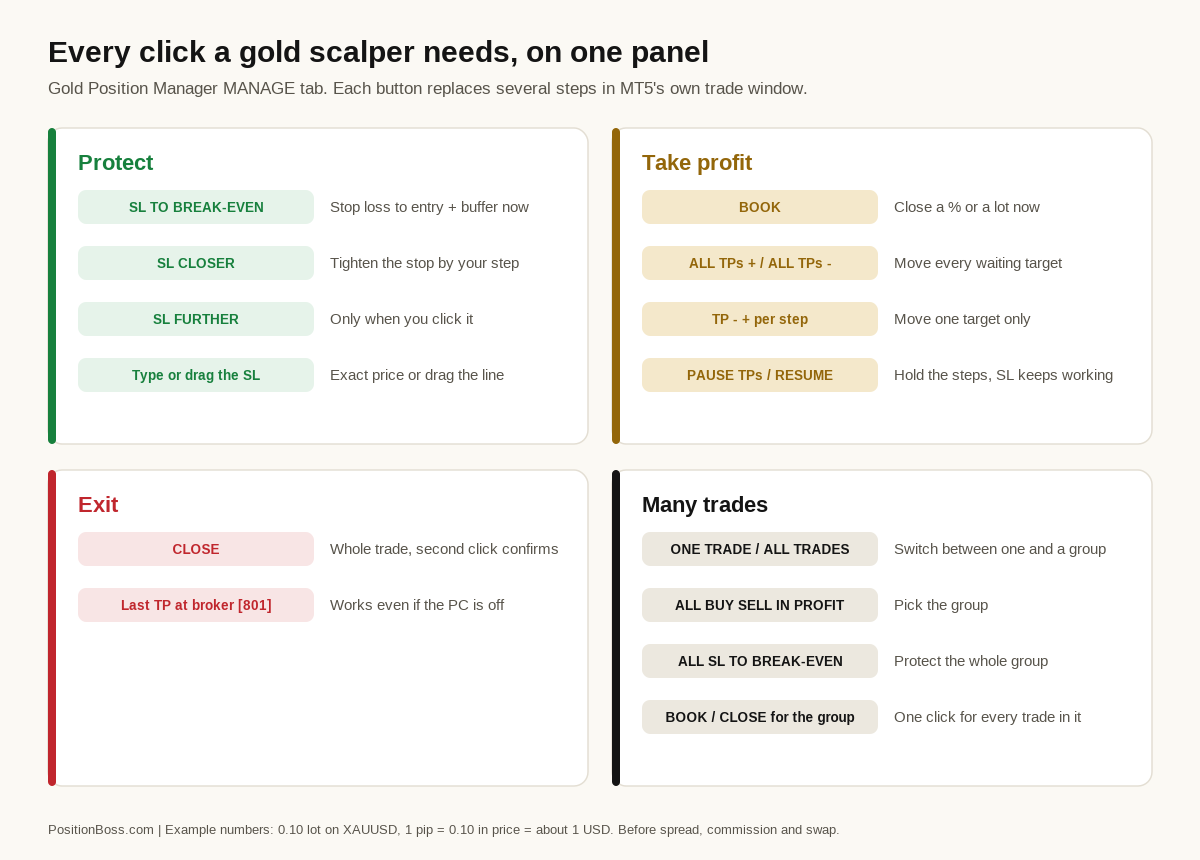
Protect the trade
| Button | What it does | By hand in MT5 |
|---|---|---|
| SL TO BREAK-EVEN | Moves the stop loss to the entry plus your buffer ([704]), now, before the plan would | Modify, type the entry price plus the buffer, confirm |
| SL CLOSER | Tightens the stop loss by your step | Modify, work out and type a new price |
| SL FURTHER | Moves the stop loss away by your step, only when you click it | Modify, type a new price |
| Price box, − / +, or drag | Type an exact price, nudge it, or drag the line on the chart | Modify and type |
The plan itself never widens a stop loss. A price typed far away from the current stop needs a second confirmation, so a typing mistake does not move your risk.
Take profit your way
| Button | What it does | By hand in MT5 |
|---|---|---|
| BOOK | Closes a % (for example 25) or an exact lot (for example 0.02) at market; the remaining steps are reduced to match | Open the trade, type the volume, close |
| ALL TPs + / ALL TPs − | Moves every waiting step further or closer, to let a strong move run or to take profit sooner | Not possible: MT5 has one TP per trade |
| TP − / + per step | Moves one step only, or type its exact price | Not possible |
| PAUSE TPs / RESUME | Holds the automatic steps; the stop loss and break-even keep working | Not possible |
A booking never closes the whole trade by accident: booking 100% asks for a second click. Your broker's minimum lot still decides the smallest part that can be closed.
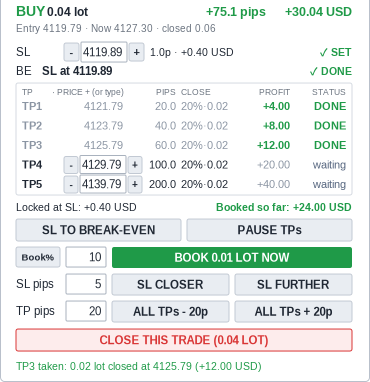
Exit
CLOSE closes the whole trade at market. It asks for a second click, because a scalper's thumb moves fast. Setting [801] can also give the last take profit to the broker, so the final target works even if your PC is off.
Many trades at once
Scalpers often hold several gold trades: two entries on the same move, or trades from different signals. Switch the panel from ONE TRADE to ALL TRADES and choose a group:
- ALL: every gold trade the panel manages.
- BUY or SELL: only one direction.
- IN PROFIT: only the trades that are positive right now.
Then one click acts on the whole group: ALL SL TO BREAK-EVEN before a news release, BOOK 20% of every trade, move every stop closer or further, or CLOSE them all (with a second click). One list shows every trade with its pips and profit, so you always see which group you are about to change.
Example: gold has run 40 pips in your favour on four BUY trades and the US jobs report is in five minutes. Choose BUY, click SL TO BREAK-EVEN: four trades protected. By hand that is four modify windows, against the clock.
One click for exceptions, automatic for the rest
The buttons are for the moments when you want to step in. The everyday routine (stop loss at once, steps every few pips, break-even after TP1) runs by itself from your settings, so on most trades you click nothing at all after the entry. How to set that routine up: gold scalping exit plan and gold scalping trade manager for MT5.
Questions
Can I move the stop loss to break-even with one click in MT5?
Not with MT5 alone: you modify the trade and type the price. A trade manager such as Gold Position Manager adds an SL TO BREAK-EVEN button, and a group button that does it for all, buy, sell or profitable trades at once.
How do I close part of a trade quickly in MT5?
By hand you open the trade window, type the volume and close. With Gold Position Manager you type a % or a lot once and press BOOK; the remaining take-profit steps adjust automatically.
Can I move all my take-profit levels at once?
Yes, with ALL TPs + and ALL TPs minus, or move a single step with its own buttons. MT5 by itself has only one take profit per trade.
Do the buttons work on the MT5 phone app?
No. The panel runs inside MT5 on your PC or VPS. On the phone you open and watch trades, and the automatic plan keeps working as long as MT5 with Gold Position Manager is running.
This guide is education, not financial advice. Every action is carried out by your broker at the price available, which can differ in fast markets. Trading gold carries a high risk of loss.