Key points
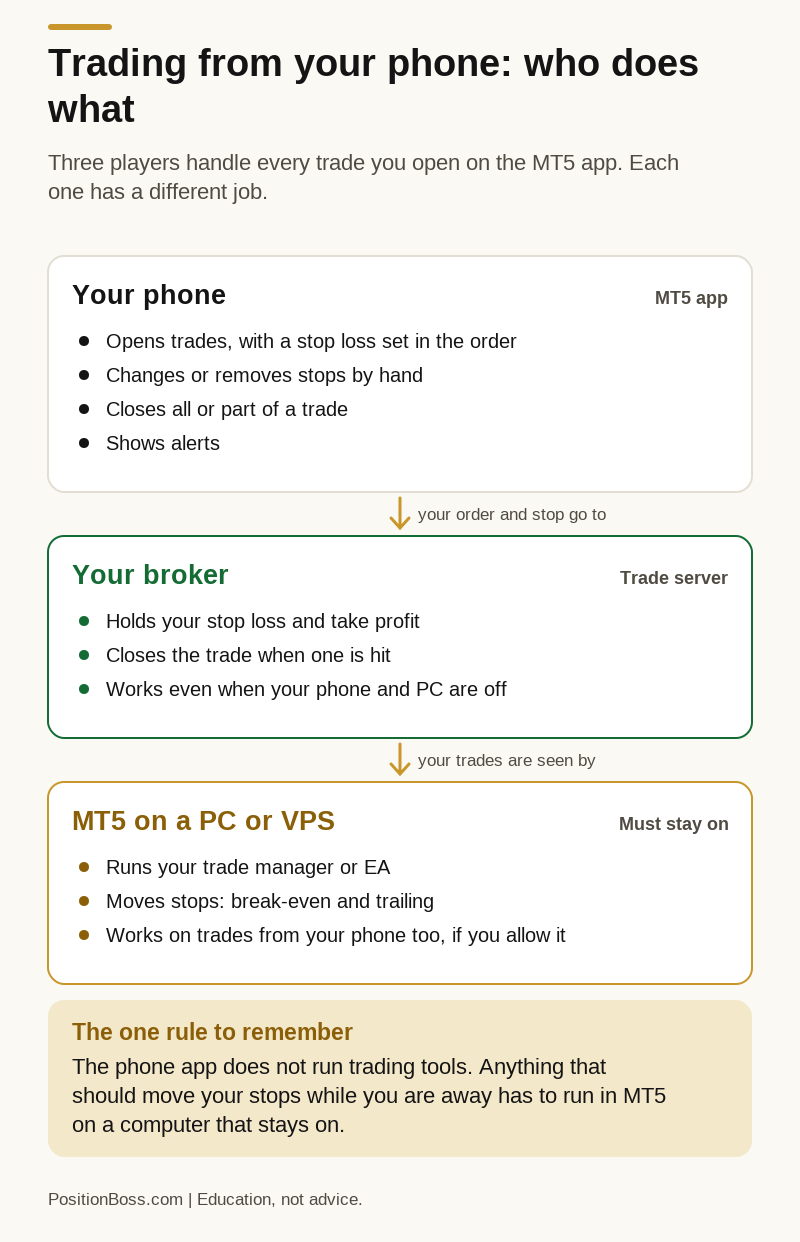
- The MT5 phone app opens, changes and closes trades, but it does not run Expert Advisors or trade managers.
- Your stop loss and take profit live at your broker, so they work even when your phone is off. Set them in the order, every time.
- To move stops by themselves (break-even, trailing), MT5 must run on a computer or VPS that stays on, with a tool that is allowed to manage your phone trades.
- Many tools only look after their own trades. Look for a setting such as "manage all trades".
Can the MT5 app manage trades by itself?
No. The MT5 phone app can open trades with a stop loss, change stops and close trades, but it does not run Expert Advisors or trade managers. To move stops automatically on phone trades, MT5 must run on a computer or a VPS, with a tool that is allowed to manage them.
Think of it as a team of three. Your phone gives the orders, your broker holds the stops, and MT5 on a computer does the babysitting. If the babysitter is asleep, nobody moves your stop.
Step 1: set the stop in the phone order, every time
In the MT5 app's order window, fill in Stop Loss before you tap Buy or Sell. In the advanced mode you can also type the stop in pips or in money, and the app shows the matching price next to it. Read that price once before you tap.
A stop set this way is held by your broker, not by your phone. It works with your phone off, in a tunnel or out of battery.
- Change it later: in the Trade tab, open the trade's menu and choose Modify Position. You can also turn on trade levels in the app settings and drag the stop line on the chart.
- Watch the memory: the app remembers the stop and target you used last time and fills them in for the next order. Handy on the same symbol, risky when you switch from gold to EURUSD.
- Closing part of a trade: the app closes all or part of a position, depending on the volume you close.
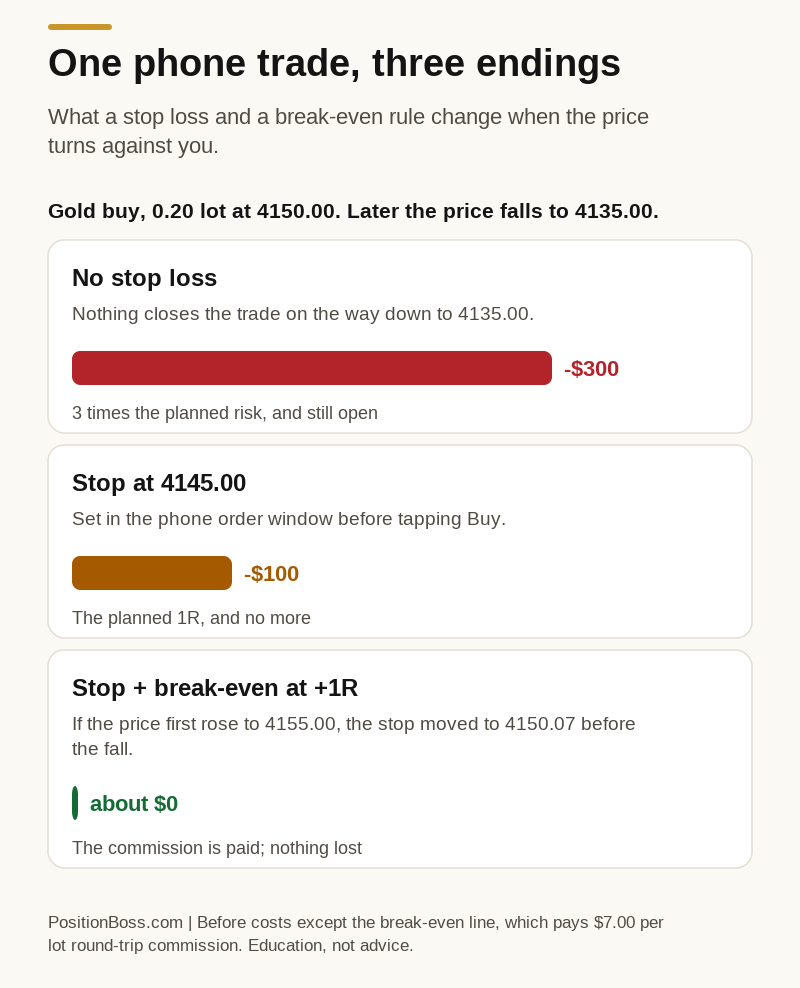
Without a stop, a $15.00 drop on 0.20 lot of gold costs $300, three times the $100 you meant to risk, and the trade is still open. With a stop at 4145.00, the most you lose is $100. Add a break-even rule, and once the price has been 1R up, the worst case is about zero.
Step 2: keep MT5 running somewhere
A stop that moves by itself needs a program, and programs run in MT5 for Windows, not in the phone app. So MT5 has to be open somewhere while you are out. You have three choices.
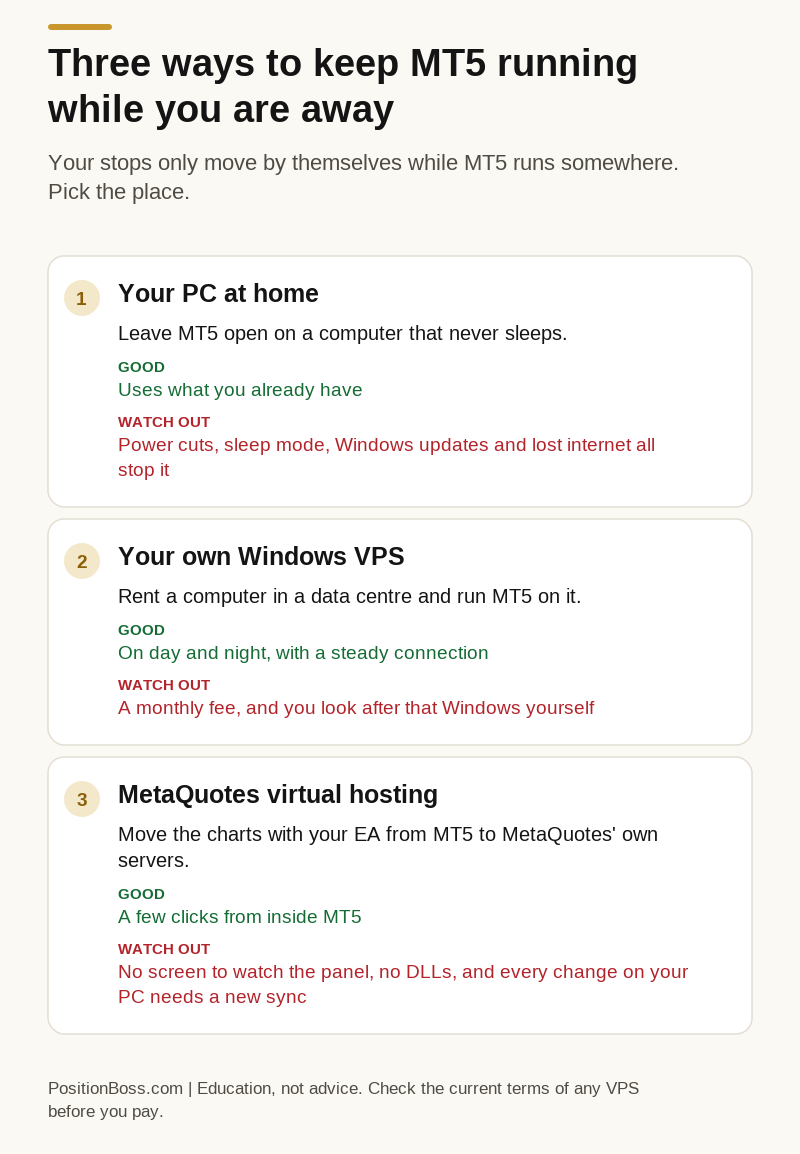
If you use MetaQuotes' own virtual hosting, remember how it works: MT5 copies the charts that have an EA on them to the server, and every change you make on your PC needs a new sync. Put your break-even and trailing settings into the tool's inputs (F7) before you sync, so the server starts with the same rules.
Our guide do MT5 EAs work when your computer is off? covers the options in more detail.
Step 3: let the tool look after phone trades
Many trade managers and EAs mark their own trades with a tag number, called a magic number. Trades you open by hand on your phone carry no such tag, so many tools simply ignore them. Look for a setting such as "manage all trades" or "manage manual trades", and switch it on.
- Open a chart in MT5 on your computer for each symbol you trade from your phone, and put the tool on it.
- Switch on the setting that lets it manage trades it did not open.
- Set your break-even and trailing distances.
- Test on a demo account: open a small trade on your phone and watch the stop move on your computer.
A gold trade from the bus, start to finish
You buy 0.20 lot of gold on your phone at 4150.00, with the stop at 4145.00: a $100 risk. At home, MT5 runs a trade manager with break-even at $5.00 (500 points), set to also pay the $7.00 per lot commission, and a trailing stop of $8.00 (800 points). Here is what happens while you ride home.
| The price (Bid) reaches | What the tool does | Stop is now |
|---|---|---|
| 4155.00 (+$5.00) | Break-even: the stop moves to the entry, plus 7 cents to pay the commission | 4150.07 |
| 4160.00 (+$10.00) | The profit is now more than $8.00, so the trail starts | 4152.00 |
| 4166.00 (+$16.00) | The trail follows, $8.00 behind the top | 4158.00 |
| Back to 4158.00 | The stop at your broker closes the trade | Closed |
The result is +$160 before costs, or $158.60 after the $1.40 commission: about +1.6R. You never touched the trade after the first two taps.
The phone app alone vs a phone plus a trade manager
| Job | MT5 phone app alone | Phone + MT5 on a PC or VPS with a trade manager |
|---|---|---|
| Stop loss at entry | Yes, typed in the order | Yes, typed in the order; check whether your tool adds one if you forget (Trade Manager does not) |
| Break-even | Only if you move it yourself in time | Moved at the profit you set, even while you sleep |
| Trailing stop | No stop moves by itself while the phone is in your pocket | Trails the price while MT5 runs |
| Close part | By hand, by closing a smaller volume | By hand, or several trades at once with a tool |
| Knowing what happened | Open the app and look | Alerts on your phone when a stop moves, if the tool sends them |
Five phone-trading mistakes
- No stop "just for a minute". A minute is enough for a news candle. Set the stop in the order.
- Trusting the remembered values. Last trade's gold stop on a EURUSD order can be miles off. Read the price before you tap.
- A sleeping computer. If Windows sleeps or updates, nothing moves your stops. Check that MT5 is open and Algo Trading is on.
- A tool that ignores phone trades. If it only manages its own trades, your phone trades get no break-even and no trail.
- Changes that never reached the VPS. On virtual hosting, a change on your PC does nothing until you sync again.
Where Trade Manager fits
We built Trade Manager for MT5. In its PRO version, Breakeven At and Trailing Stop work on every trade of the chart's symbol, and one switch decides whether that means only the panel's own trades or also trades you open by hand, including on your phone. The worked example above follows its exact rules.
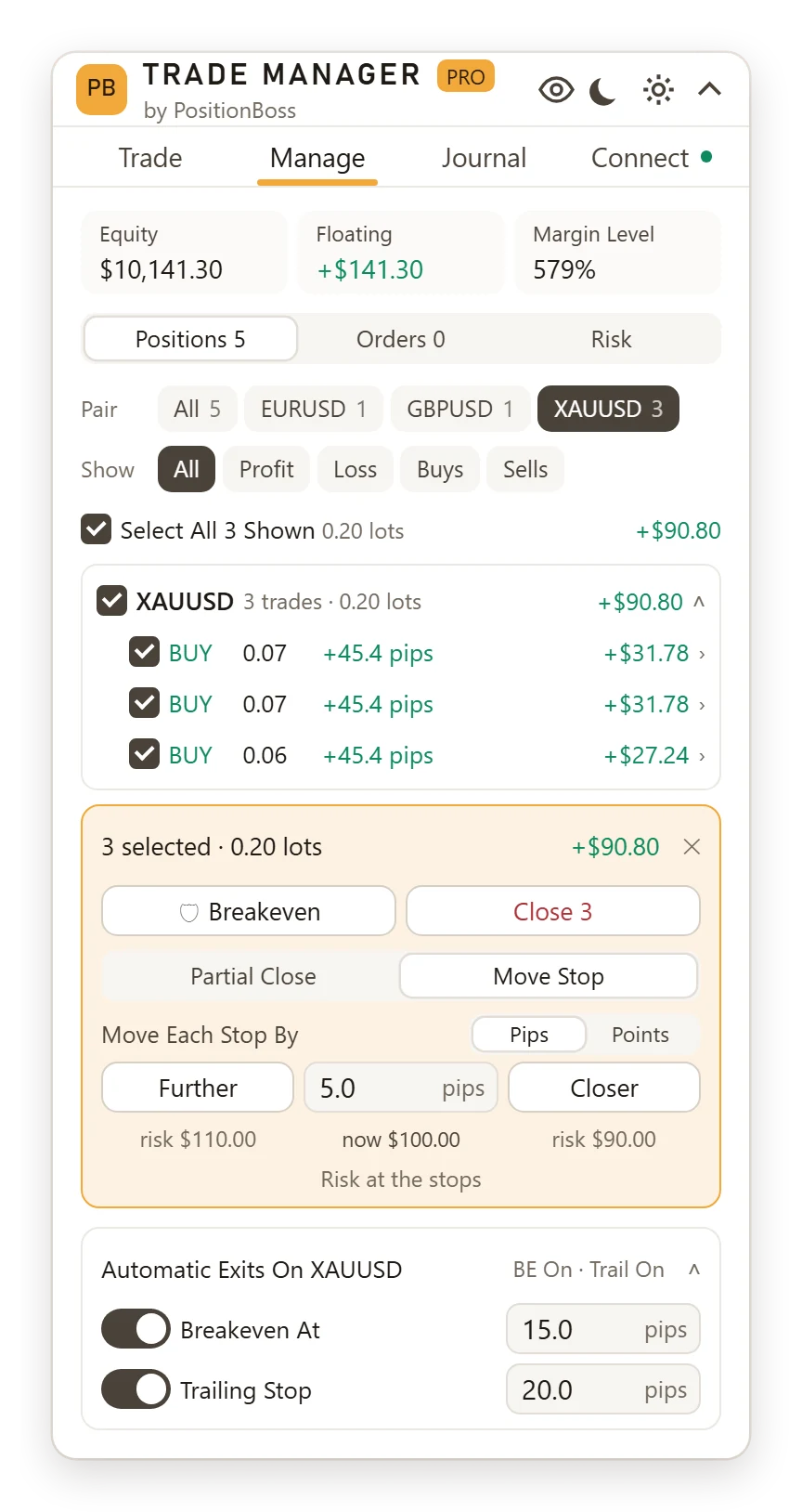
To be clear about the limits: it does not add a stop when you open a trade on your phone. If a trade has no stop, break-even or trailing only adds one after the trade is that far in profit. The PRO Connect tab can also send a message to your phone when a stop moves, using your MetaQuotes ID, and post your trades to Telegram and Discord.
You can see the PRO options, or read about the trailing methods in our trailing stop guide.
Summary
The MT5 phone app opens and closes trades well, but it does not look after them. Set the stop in every phone order, keep MT5 running on a PC or VPS, and use a trade manager that is allowed to manage your phone trades. Then break-even and trailing work while the phone stays in your pocket.
Questions
Can I run an Expert Advisor on the MT5 phone app?
No. Expert Advisors and trade managers run in MT5 for Windows on a computer or VPS. The phone app shows their trades and lets you trade by hand.
How do I set a stop loss in the MT5 app?
Fill in Stop Loss in the order window before you tap Buy or Sell, as a price or, in the advanced mode, in pips or money. To change it later, open the trade in the Trade tab and choose Modify Position.
Will my EA manage trades I open on my phone?
Only if it is set to. Many tools manage only their own trades, marked by their magic number, so look for a setting such as manage all trades or manage manual trades.
Does a trailing stop work on phone trades?
Yes, if MT5 on a computer or VPS is running it. MT5's trailing stop and trade managers run in the desktop platform, not at your broker, so they stop when that MT5 is closed.
Do I need a VPS to trade from my phone?
Not if a computer at home stays on with MT5 open. A VPS helps when it cannot, because it keeps MT5 running day and night.
Sources
- MetaTrader 5 for iPhone Help: opening and closing positions (stop loss in price, pips or money)
- MetaTrader 5 for iPhone Help: modifying a position
- MetaTrader 5 Help: migration to virtual hosting
- MetaTrader 5 Help: trailing stop runs in the platform, not on the server
- FXTM Help: Expert Advisors and the MetaTrader mobile apps
- Exness Help: are Expert Advisors available for mobile platforms?
This guide is education, not financial advice. The example prices are made up. A stop can fill worse than its price in fast markets or over a gap, and trading gold, forex and indices with leverage carries a high risk of losing money.