Key points
- MT5 has no Telegram or Discord button. You need an Expert Advisor that watches your trades and posts them.
- One MT5 setting is a must: allow the Telegram and Discord addresses in Tools > Options > Expert Advisors.
- Telegram allows about one message per second in a chat and 20 per minute in a group, so updates made together should go out as one message.
- MT5 must stay open for messages to go out. Use one computer for sending, or members get every message twice.
Can MT5 send trades to Telegram by itself?
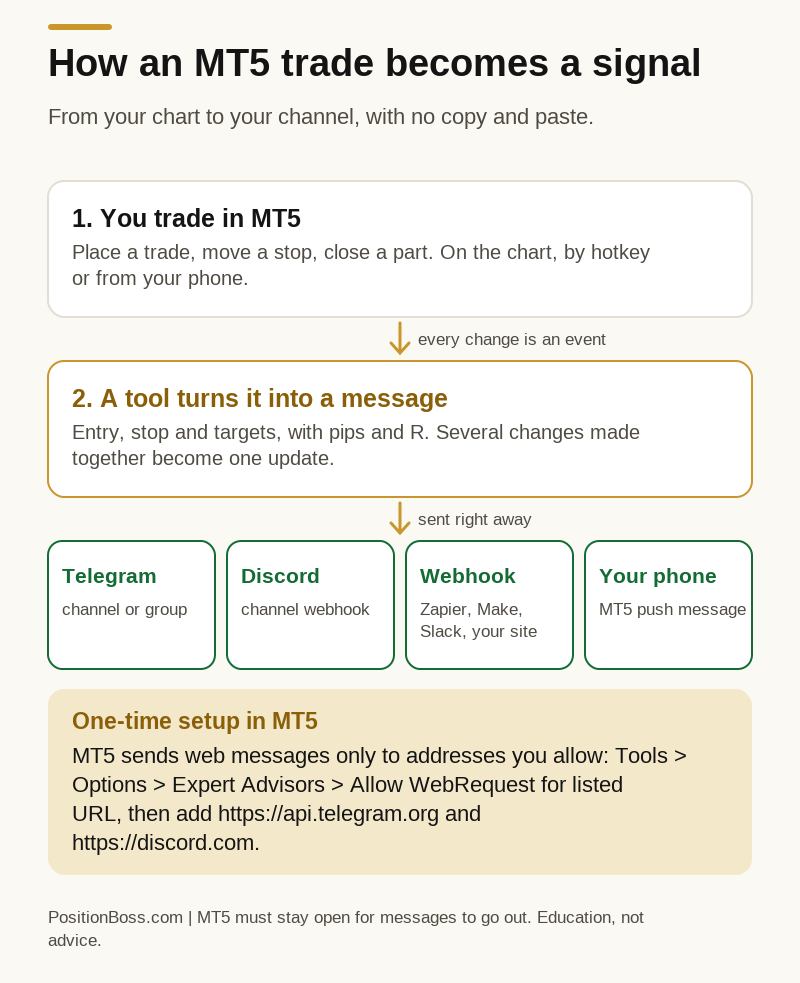
Not on its own. MT5 has no built-in Telegram or Discord button. You need an Expert Advisor that watches your trades and posts them, and you must allow its web addresses in Tools > Options > Expert Advisors. MT5 also has to stay open while the messages go out.
Two MT5 features sound close but are different. Push notifications go to the phones whose MetaQuotes IDs you enter in Tools > Options > Notifications, not to a channel. And MQL5 Signals lets other people copy your trades into their accounts, which is a separate service with its own rules.
The manual way, and why it breaks
By hand, one trade with two targets means four messages: the signal, TP1 hit, the stop moved to the entry, and TP2 hit. Each one needs the right price, the pips and the result, typed while the market moves. Do that on two platforms, for three trades a day, and mistakes are only a matter of time.
- Typos. A stop typed as 4154.00 instead of 4145.00 tells your members the wrong story.
- Late updates. If you post TP1 ten minutes after it happened, the update is old news.
- Forgotten updates. The stop you moved to break-even never reaches the channel, so members still hold the old stop.
Step 1: let MT5 talk to Telegram and Discord
MT5 only sends web messages to addresses you allow, and this is the step most people miss.
- In MT5, open Tools > Options > Expert Advisors.
- Tick Allow WebRequest for listed URL.
- Add https://api.telegram.org for Telegram and https://discord.com for Discord, plus any webhook address you use.
- Press OK.
One more thing from the MQL5 documentation: web requests do not work in the Strategy Tester. Test your signals on a demo account with a live chart, not in a backtest.
Step 2: create the Telegram bot and the Discord webhook
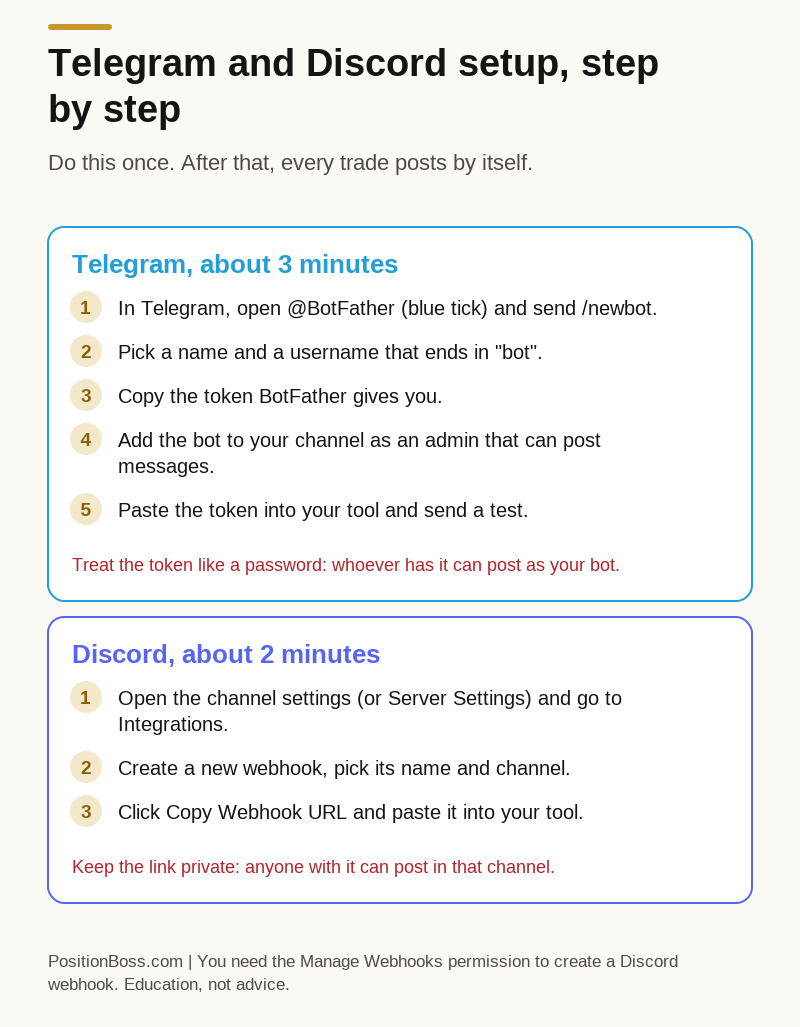
Telegram: open @BotFather, send /newbot, pick a name and a username ending in "bot", and copy the token. Telegram's own tutorial says to treat that token like a password; if it leaks, you can revoke it in BotFather. Then add the bot to your channel or group as an admin that can post messages.
Discord: in the channel or server settings, open Integrations, create a webhook, choose its channel and copy the webhook URL. You need the Manage Webhooks permission for this. The link works without any login, so keep it private.
What a good signal message looks like
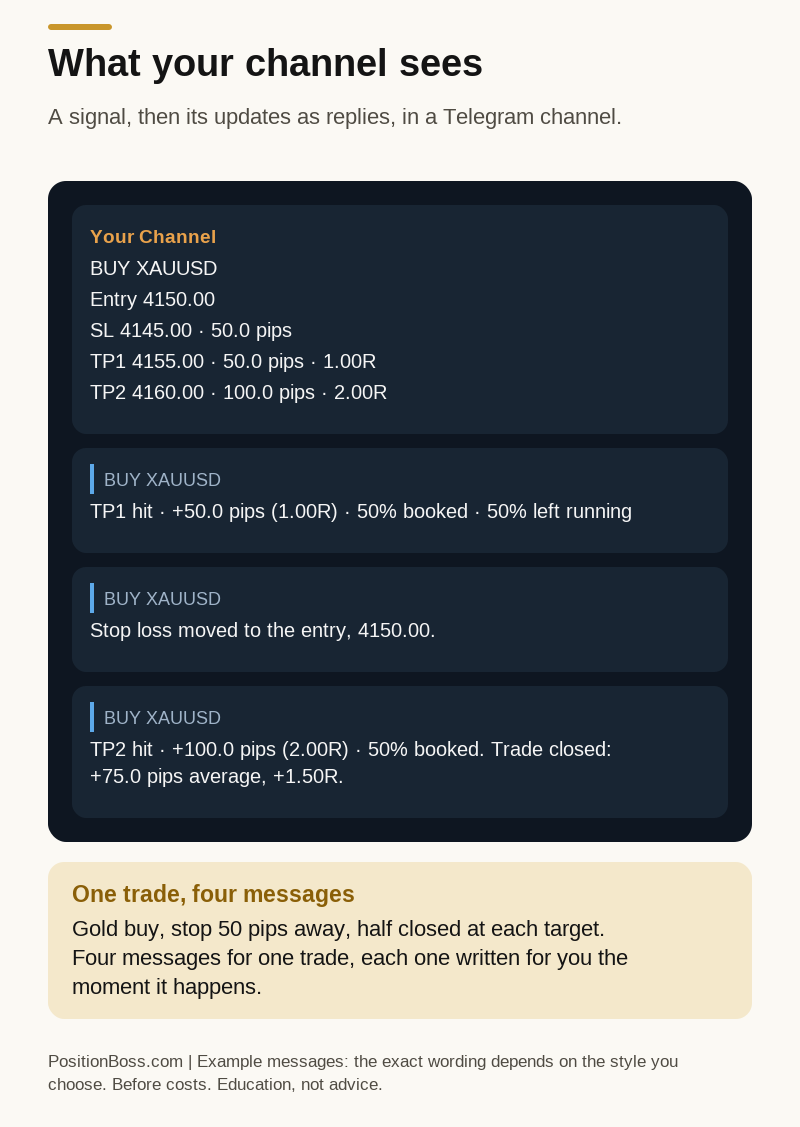
A good signal answers three questions at a glance: which way, where it is wrong, and where it is going. In the example, the stop is 50 pips away and the two targets are 1R and 2R, so members can size their own lots from their own risk.
Each update says what happened and what is left: "TP1 hit, +50.0 pips (1.00R), 50% booked, 50% left running". When the trade closes, the last message sums it up: +75.0 pips on average, which is +1.50R.
On Telegram, updates can sit as replies under the signal, so the whole story stays together. Discord's webhook documentation describes editing a message, but not replying to one, so there updates arrive as new messages.
Limits to know before you go live
| Where | Limit | What it means for you |
|---|---|---|
| Telegram chat | About 1 message per second | Five stop moves sent one by one need at least four extra seconds; one combined update needs one message |
| Telegram group | 20 messages per minute | A busy session with many updates can hit the cap |
| Discord message | Up to 2,000 characters | Plenty for a signal; keep long notes short |
| MT5 phone push | 255 characters, 2 per second, 10 per minute | Good for short alerts to yourself, not for a full signal |
| MT5 itself | Must be open, on a live chart | Close MT5, and nothing is sent; no messages from the Strategy Tester |
One more trap: if MT5 runs on your PC and on a VPS at the same time, both may post every trade. Choose one computer as the sender.
Posting by hand vs posting automatically
| Job | By hand | With a signal tool in MT5 |
|---|---|---|
| The signal | Typed from the chart, after the entry | Posted from the order itself, with pips and R |
| TP hit, stop moved | Only if you notice and have time | Posted when it happens, as an update |
| Five changes at once | Five messages, or one long one | One combined update, if the tool supports it |
| Two platforms | Everything twice | Both at the same time |
| The final result | Worked out by hand | Average pips and R, worked out for you |
Before you share signals with others
- Post the losers too. A channel that only shows wins loses trust fast, and an automatic tool posts every result anyway.
- Show the risk. Pips and R let each member size their own trade, instead of copying your lot size.
- Know your local rules. In some countries, selling or publishing trade signals can count as investment advice. Check before you charge for a channel.
- Never ask for passwords. Members never need your login, and you never need theirs.
Where Trade Manager fits
We built Trade Manager for MT5, and its PRO version has a Connect tab that does all of the above. It posts to Telegram, Discord, any webhook (for example Zapier, Make, Slack or your own site) and your phone, either instantly or after you press Send.
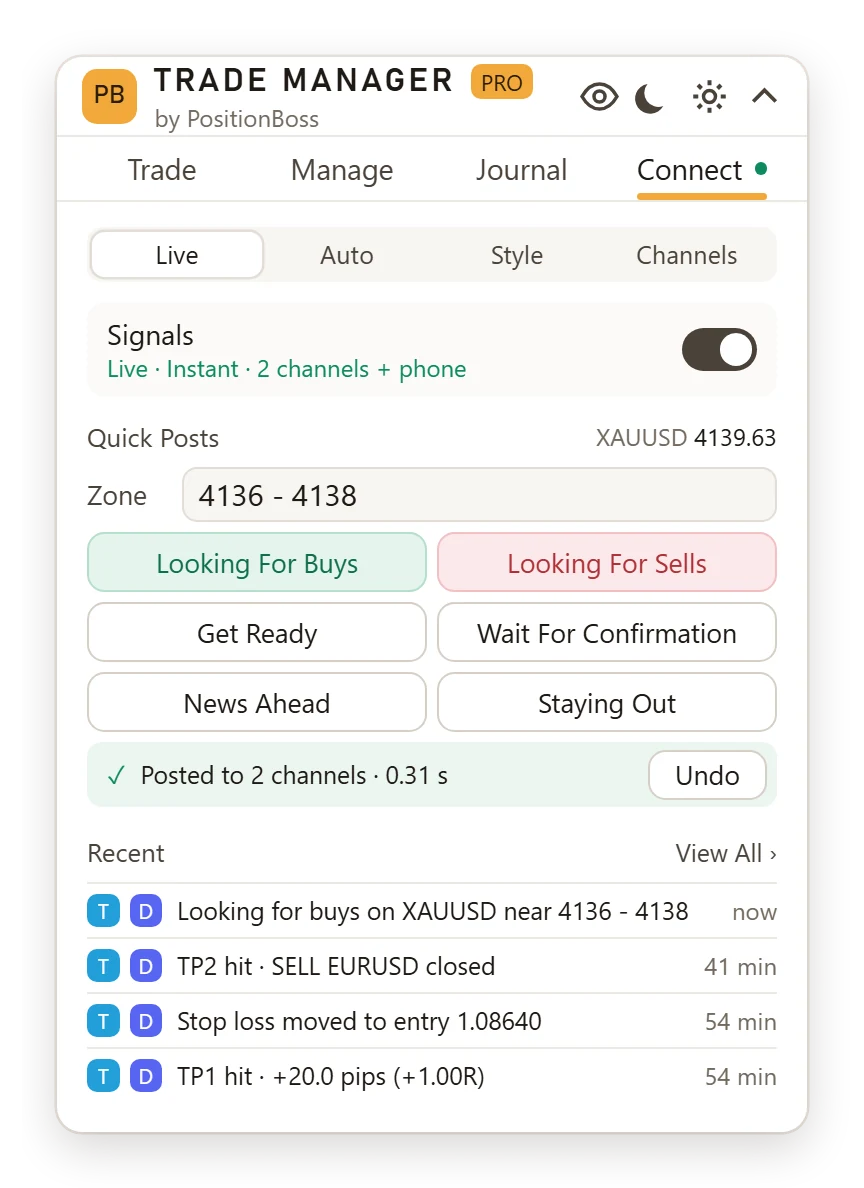
- Every event you choose: new trade, TP hit, stop loss hit, stop or target moved, break-even, partial close, closed by hand, and pending orders filled, moved or cancelled.
- One update for changes made together: move five stops at once, and members get one message, not five.
- Quick posts: type a price zone and post "Looking For Buys", "Get Ready" or "News Ahead" in one click, with Undo for 10 seconds.
- Your style and your rules: Clean, Emoji or Copier style; up to six channels, each getting everything, entries and results, or results only; and one switch so only one computer sends.
It works only while MT5 is open on a live chart, and it is part of PRO, not the free version. You can see the Connect tab or follow the full setup in the user guide.
Summary
To send MT5 trades to Telegram and Discord automatically, you need three things: a Telegram bot or a Discord webhook, their addresses allowed in Tools > Options > Expert Advisors, and a tool in MT5 that posts each trade and update. Keep MT5 running on one computer, keep your token and webhook link private, and let combined updates keep you under Telegram's limits.
Questions
Can MT5 send trades to Telegram without an EA?
No. MT5 has no built-in Telegram or Discord sharing. You need an Expert Advisor that watches your trades and posts them through the Telegram Bot API or a Discord webhook.
Why are my MT5 messages not reaching Telegram?
A common reason is that https://api.telegram.org is not in Tools > Options > Expert Advisors > Allow WebRequest. Next, check that the bot is an admin of the channel with the right to post messages.
Does sending MT5 signals work in the Strategy Tester?
No. Web requests do not run in the Strategy Tester, so test your signals on a demo account with a live chart.
Is it safe to share my Telegram bot token?
No. Whoever has the token can post as your bot, so treat it like a password. If it leaks, revoke it in @BotFather and use the new one.
How fast can MT5 post to a Telegram channel?
Telegram asks bots to send no more than about one message per second in a single chat, and 20 per minute in a group. A tool that combines changes made together into one update helps you stay inside those limits.
Sources
- MQL5 Reference: WebRequest (allowed URL list, not in the Strategy Tester)
- MQL5 Reference: SendNotification (255 characters, 2 per second, 10 per minute)
- Telegram Bot FAQ: sending limits
- Telegram: bot tutorial (BotFather and the token)
- Discord Support: intro to webhooks
- Discord Developer Docs: webhooks (2,000 characters, editing messages)
This guide is education, not financial advice. The example trade is made up. Trading forex, gold and indices with leverage carries a high risk of losing money, and anyone who follows a signal carries their own risk.