Key points
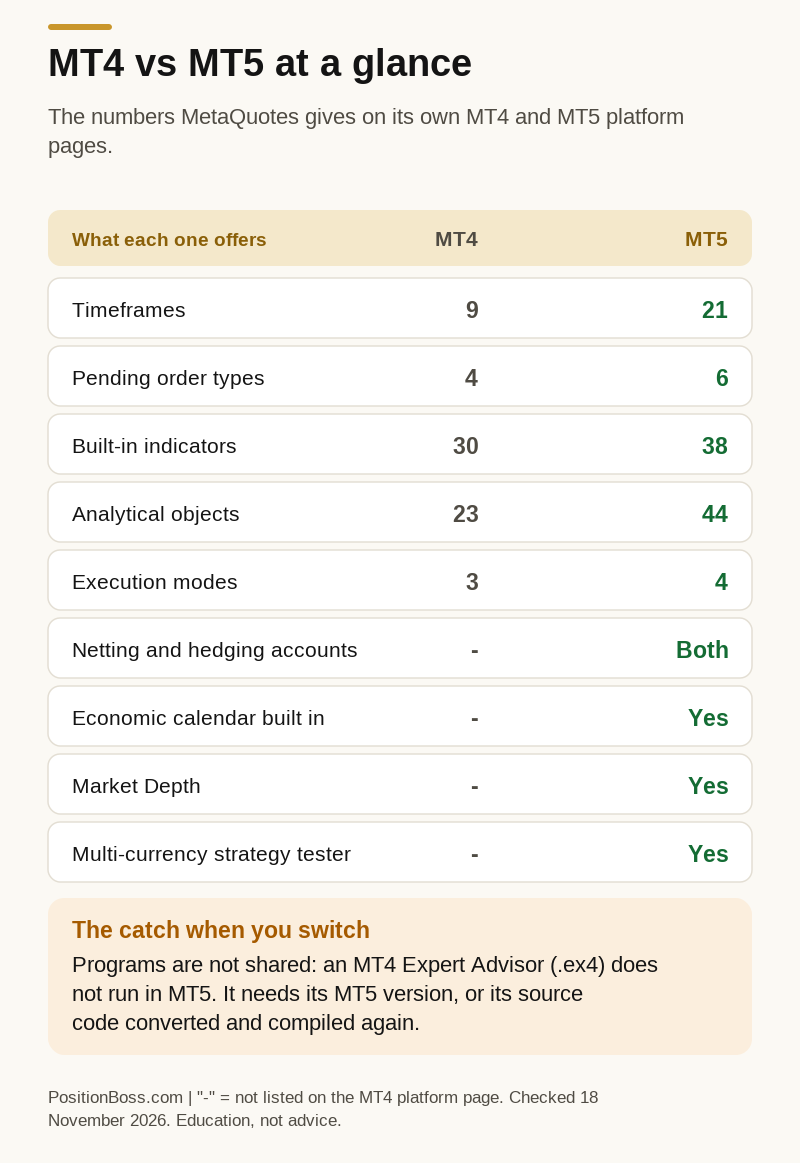
- MT5 does what MT4 does, and more: 21 timeframes instead of 9, 6 pending order types instead of 4, and a built-in calendar.
- The biggest catch: MT4 programs (.ex4) do not run in MT5. Every EA and custom indicator needs its MT5 version.
- MT5 accounts come as netting or hedging. That choice changes how several trades on one symbol behave.
- How fast your orders fill depends mostly on your broker, not on the number in the app's name.
MT4 vs MT5 for forex trading: the short answer
For forex trading, MT5 does everything MT4 does and adds more: 21 timeframes instead of 9 and 6 pending order types instead of 4. It also has a built-in calendar, a multi-currency tester and both netting and hedging accounts. The catch: MT4 programs do not run in MT5, so your EAs need MT5 versions.
Think of it as moving to a bigger flat in the same building. The rooms you know are all there, and a few new ones appear. But your old furniture (your EAs and indicators) does not fit through the new door.
What stays the same
The basics feel familiar from the first minute. Both platforms list 2 market order types, 2 stop orders and a trailing stop. In both, you place trades from the chart or from the New Order window, so your habits move across.
What changes is everything around them: more order types, more ways to see the market, and a new rule for how trades add up.
Orders: two new pending types
MT4 has four pending orders: Buy Limit, Sell Limit, Buy Stop and Sell Stop. MT5 keeps those and adds two more: Buy Stop Limit and Sell Stop Limit. They wait for a breakout, then try to buy or sell on the pullback.
For example, a Buy Stop Limit with a stop price of 1.08500 and a limit price of 1.08400 does nothing until the Ask reaches 1.08500. Then it places a Buy Limit at 1.08400, so you only buy if the price comes back to that level after the breakout.
A Sell Stop Limit is the mirror image. When the Bid falls to its stop price, it places a Sell Limit higher up, so you sell only on a bounce.
Netting vs hedging: the account type matters more than the app
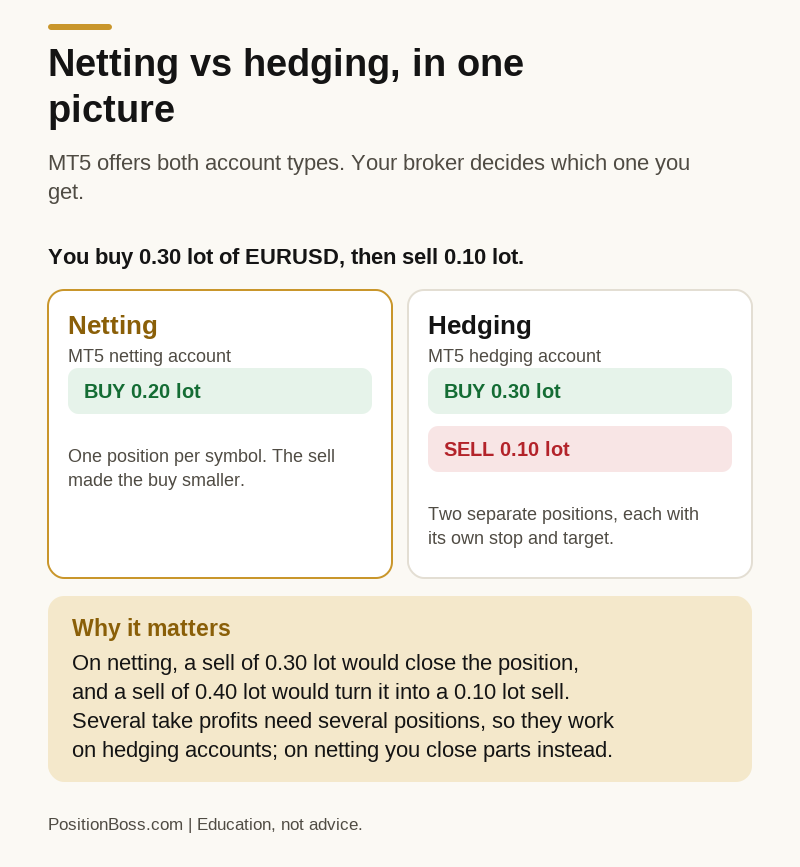
On a netting account, MT5 keeps one position per symbol. A trade in the same direction makes it bigger, and an opposite trade makes it smaller, closes it, or turns it around. On a hedging account, every trade is its own position, just as every order is separate in MT4.
This matters for your exits. Several take profits need several positions, so they work best on hedging accounts. On netting, you close parts of the one position instead.
Ask your broker or prop firm which type you have before your first trade.
Is MT5 faster than MT4?
MetaQuotes lists four execution modes for MT5 (Instant, Request, Market and Exchange) and three for MT4. But how fast your order fills depends mostly on your broker. Its execution mode, how busy its servers are and how far you are from them all count.
So do not switch for speed alone. If speed matters to you, test both on demo accounts at the same broker, and consider a VPS close to the broker's server.
Order management tools MT5 adds
- Close many trades at once. Turn on One Click Trading, then right-click the Trade tab and open Group operations. You can close all trades, only winners or losers, or everything on one symbol.
- A built-in economic calendar. The Calendar tab in the Toolbox shows upcoming events and can put them on your charts, handy before news.
- Market Depth. Where your broker provides it, you can see the order book and trade from it.
- A multi-currency tester. You can test a strategy across several symbols at once in the Strategy Tester.
Our guide to news trading in MT5 shows how the calendar and the close-all tools work together on a busy day.
MT5 one click trading setup
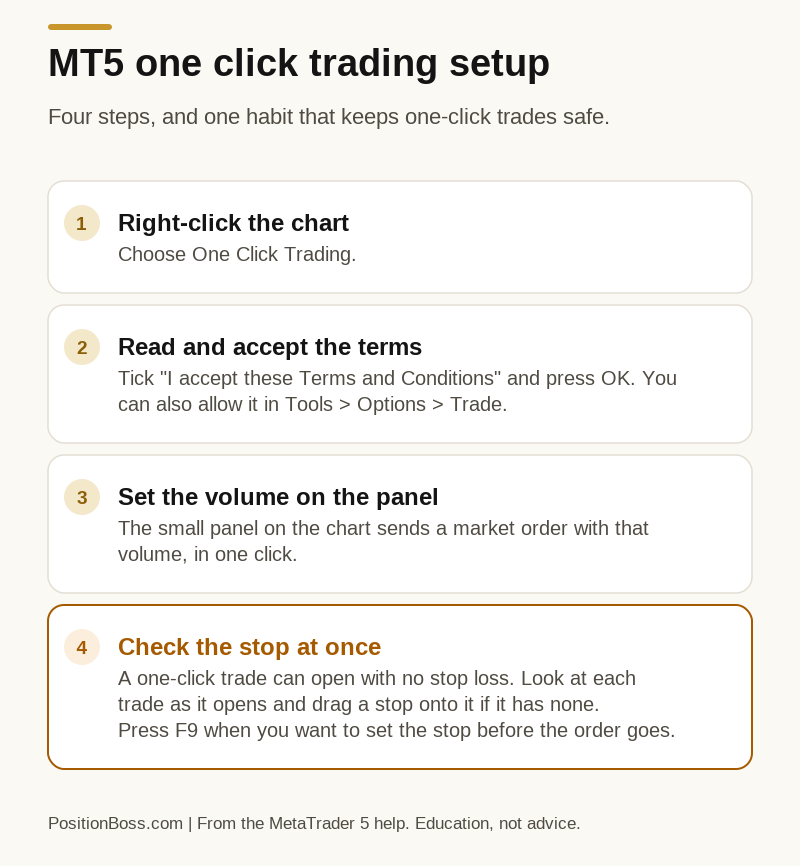
Right-click the chart, choose One Click Trading and accept the terms; you can also allow it in Tools > Options > Trade. A small panel appears on the chart, and the volume you set there is sent with one click on Buy or Sell.
One habit makes it safe: a one-click trade can open with no stop loss. Look at each trade as it opens and drag a stop onto it if it has none. When you want to set the stop before the order goes, use the New Order window (F9) instead.
Moving from MT4 to MT5: a checklist
- Ask about the account type: netting or hedging?
- Check every symbol you trade in Market Watch > Specification. Names, digits and contract sizes can differ between brokers and even between account types, so re-check your lot size maths.
- Get MT5 versions of your tools. An .ex4 file does not load in MT5; you need the seller's MT5 version, or the source code converted and compiled again.
- Rebuild your templates and chart layouts, and set up One Click Trading if you use it.
- Trade a demo account for a week before you trade real money, and compare the fills with what you expect.
Your first week on MT5: four small surprises
Almost every trader who moves across meets the same few surprises. None of them is a problem once you know it is coming.
- Your second trade joined the first. On a netting account, a second buy on the same symbol does not open a new trade. It makes the one position bigger, so the Trade tab shows one line, not two.
- Your old robot is missing. An .ex4 file copied into MT5 does not run there. If an EA or indicator is missing from the Navigator, you need its MT5 version.
- Your pair has a new name. Some brokers add a letter or a sign to symbol names. If you cannot find your pair, search for it in Market Watch.
- New words: order, deal, position. In MT5, an order is your instruction, a deal is the trade that fills it, and a position is what you hold afterwards. The History tab can show your past trades in any of the three views.
Order management in MT4 and MT5, by hand
| Job | MT4 | MT5 |
|---|---|---|
| Lot size from your risk | By hand, with a calculator | By hand, with a calculator |
| Pending order types | 4 | 6, including stop limit orders |
| Several trades on one symbol | Separate orders | Separate positions on hedging; one position on netting |
| Close everything at once | Not listed on its platform page | Group operations, with One Click Trading on |
| News times | An outside calendar | Built-in Calendar tab |
| Your EAs | .ex4 programs | .ex5 programs; MT4 ones need an MT5 version |
Neither platform sizes your lot from your risk or splits a trade into several targets by itself. That is the gap on-chart trade managers fill on both platforms; our comparison of MT5 trade managers covers the options.
So which one should you use?
Sometimes the choice is made for you: some brokers and prop firms offer only one platform. If you do get to choose, a simple rule works.
- Stay on MT4 for now if a tool you rely on has no MT5 version yet and you cannot replace it.
- Choose MT5 if you are starting fresh, want the extra timeframes, order types and calendar, or your firm offers only MT5.
Either way, your risk rules matter far more than the platform. A 1% risk per trade is the same 1% on both.
Where Trade Manager fits
We built Trade Manager for MT5 only; there is no MT4 version. It reads each symbol's contract details from your broker, so the lot size stays right after a switch. On a netting account, where a position can have only one take profit, it places one order with the first target.
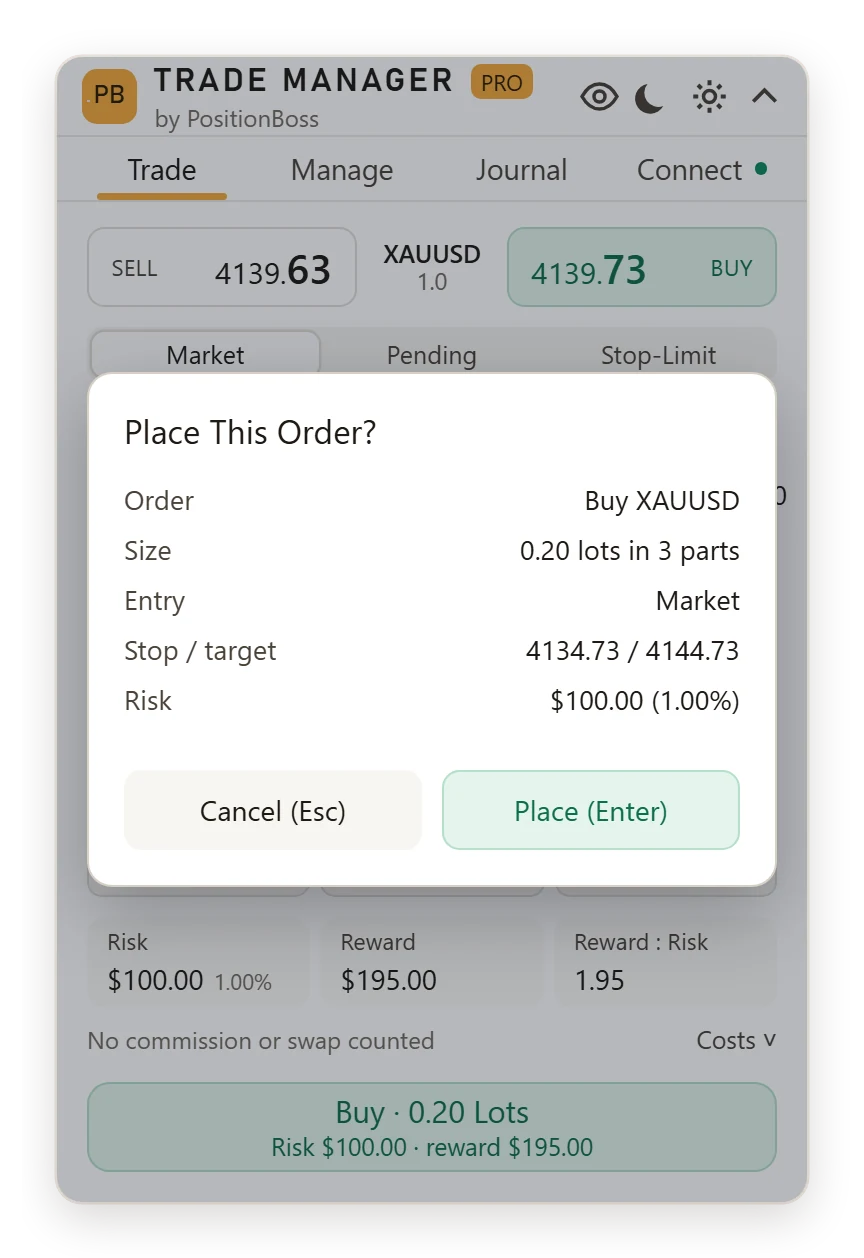
Its trade button sends the stop and target with the order. It can also show this last check first, so a fast entry never goes out without a stop. You can get the free version or read the complete guide to MT5 trade management.
Summary
For forex trading, MT5 gives you everything MT4 has, plus more timeframes, two more pending order types and both account types. It also adds a built-in calendar and a multi-currency tester.
The real work in switching is your tools: MT4 programs do not run in MT5. Check your account type and symbol specifications, test on demo, and set up One Click Trading with the stop-loss habit before you go live.
Questions
Is MT5 better than MT4 for forex trading?
MT5 has more timeframes, more order types, a built-in calendar and a multi-currency tester, and it does everything MT4 does. Whether it is better for you depends mostly on whether your broker offers it and whether your tools have MT5 versions.
Can I use my MT4 EAs and indicators in MT5?
Not as they are: MT4 programs (.ex4) do not run in MT5. You need the MT5 version from the seller, or the source code converted to MQL5 and compiled again.
Do prop firms use MT4 or MT5?
It depends on the firm, and some offer both. Check which platform and which account type (netting or hedging) your firm gives you before your first trade.
Is MT5 faster than MT4?
Fill speed depends mostly on your broker's servers, its execution mode and your connection, not on the platform's version. Test both at the same broker if speed matters to you.
How do I turn on one click trading in MT5?
Right-click the chart, choose One Click Trading and accept the terms, or allow it in Tools > Options > Trade. A one-click trade can open with no stop loss, so check each trade and add one at once.
Sources (checked 18 November 2026)
- MetaQuotes: MetaTrader 5 trading platform (timeframes, order types, execution modes, netting and hedging)
- MetaQuotes: MetaTrader 4 trading platform (timeframes, order types, execution modes)
- MetaTrader 5 Help: order types, netting and hedging
- MetaTrader 5 Help: One Click Trading
- MetaTrader 5 Help: executing trades and Group operations
- MQL5 forum: will MT4 programs work in MT5?
This guide is education, not financial advice. Platform features depend on your broker, and what your broker or prop firm offers can change. Trading forex, gold and indices with leverage carries a high risk of losing money.